When organizations consider sensitivity labels, they usually focus on protecting documents, emails, Teams, or SharePoint sites. But the question that’s often overlooked:
What about the security groups that control access to all those resources?
While security groups don’t store business data, they define access to critical organizational resources. Their configuration directly influences who can access sensitive applications, systems, and data across the Microsoft Entra environment. If they’re poorly governed or difficult to identify, managing privileged access becomes increasingly challenging as your Microsoft Entra environment grows.
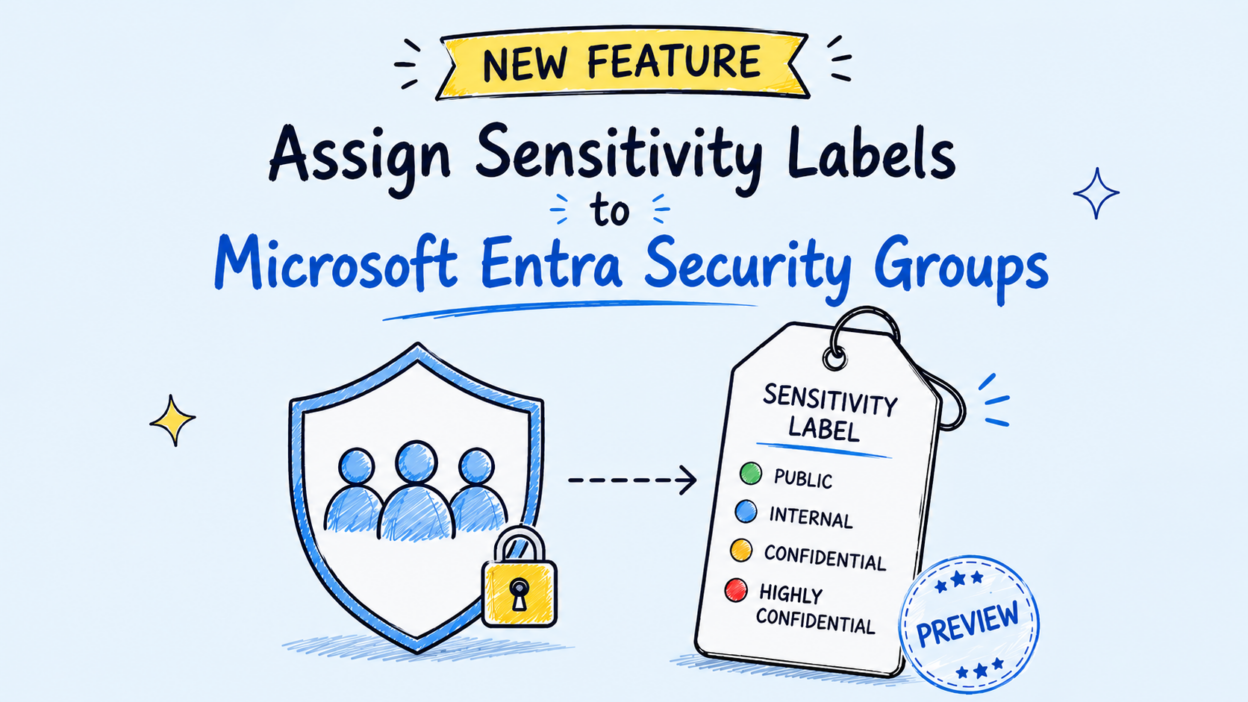
Recognizing the need for stronger identity governance, Microsoft now supports assigning sensitivity labels to security groups through the Preview capability.
This doesn’t change the permissions of the security group itself; it introduces an additional layer of governance by making sensitive groups easier to identify, organize, and manage.
The New: Assign Sensitivity Labels to Security Groups
This new feature allows administrators to assign sensitivity labels directly to supported Entra security groups.
Organizations can assign predefined or custom sensitivity labels, such as Public, Internal, Confidential, or Highly Confidential, to security groups based on the level of access those groups provide. This establishes a consistent classification model across both information assets and identity objects.
It’s equally important to understand the scope of this capability. Assigning a sensitivity label to a security group does not modify its permissions, membership, or access rights.
Instead, the label serves as a governance mechanism that helps administrators identify, categorize, and manage security groups according to their business criticality and organizational policies.
Why Sensitivity Labels for Security Groups Are Different from Microsoft 365 Groups
Although Purview already supports sensitivity labels for Microsoft 365 Groups, the objective of labeling security groups is fundamentally different.
Microsoft 365 Groups are collaboration containers that connect services such as Microsoft Teams, SharePoint Online, Outlook, and Planner. Applying a sensitivity label primarily governs how the collaboration workspace is configured by enforcing settings such as privacy, guest access, and external sharing.
Microsoft Entra security groups, on the other hand, are identity objects that control access to applications, administrative roles, and other protected resources. Rather than facilitating collaboration, they are evaluated during authorization to determine whether a user is permitted to access a specific resource.
As a result, the membership of a security group directly influences access decisions across Microsoft Entra and integrated applications.
Because of this distinction, policy enforcement for security groups requires membership evaluation beyond direct group members. When a sensitivity label enforces restrictions, Entra evaluates the group’s effective membership, including users who inherit membership through nested security groups. This ensures that label-based policies are applied consistently across the complete membership hierarchy at the time access is evaluated.
Important Considerations Before Using Sensitivity Labels
Since this capability is currently in Preview, we should understand a few implementation behaviors before rolling it out in production. Some of these differ significantly from how sensitivity labels work for Microsoft 365 Groups.
Label Assignment Is Permanent
Unlike Microsoft 365 Groups, sensitivity labels assigned to supported Microsoft Entra security groups cannot currently be changed or removed after they are applied.
If a security group is assigned the wrong label, the recommended approach is to create a new security group with the appropriate label and migrate the membership. For this reason, it’s important to define your labeling strategy carefully before applying labels to production groups.
Review Label Policies Before Making Changes
Although the label assigned to a security group is permanent, we can still modify the underlying sensitivity label policy in Microsoft Purview. However, policy updates don’t always affect existing memberships retrospectively.
For example, if a label is updated to prohibit guest members, existing guest accounts already present in security groups using that label aren’t automatically removed. The updated policy only affects future membership changes.
Microsoft therefore recommends minimizing policy changes for labels that are already assigned to production security groups. Any resulting membership inconsistencies must be reviewed and remediated by administrators.
Plan for Nested Security Groups
Many organizations use nested security groups to simplify access management. Because permissions are inherited through group nesting, Microsoft validates the sensitivity labels applied across the hierarchy.
A child security group must have a sensitivity label that is equally or more restrictive than its parent group. This helps prevent a less restrictive group from becoming an indirect path to resources protected by a more sensitive parent group.
Administrators should also note that a parent group with existing nested groups cannot be labeled directly. The nested groups must first be removed, appropriate labels assigned, and the hierarchy rebuilt in accordance with Microsoft’s labeling requirements.
Understand Preview Administrative Exceptions
During the Preview phase, sensitivity label enforcement doesn’t apply uniformly across every administrative operation.
Certain highly privileged Microsoft Entra administrator roles, along with applications granted specific Microsoft Graph permissions, can perform membership operations that bypass label enforcement. Microsoft has indicated that this behavior is subject to change before the feature reaches general availability.
Organizations evaluating the feature should take these exceptions into account when designing governance processes and documenting administrative controls.
Prerequisites for Using Sensitivity Labels to Security Groups
Before assigning sensitivity labels, you’ll need to enable the feature in your tenant. Unlike Microsoft 365 Groups, support for security groups uses a separate Group.Security directory settings template.
As a result, organizations that have already enabled sensitivity labels for Microsoft 365 Groups must complete an additional configuration for Microsoft Entra security groups.
To use this capability, ensure that:
- Your tenant has the required Microsoft Entra or Microsoft 365 licensing.
- Sensitivity labels are created and published from Microsoft Purview with support for Groups and Sites.
- Label synchronization between Microsoft Purview and Microsoft Entra has completed.
- The EnableMIPLabels directory setting is enabled for the Group.Security template.
Microsoft currently recommends using Microsoft Graph PowerShell to configure the required directory settings. After publishing labels, allow sufficient time for synchronization before they become available for assignment.
How to Assign a Sensitivity Label to a Security Group
Once the plumbing is in place, applying a label to a new group in the Entra admin center is easy. Administrators can apply a label when creating a new security group or assign one later from the group’s Properties page in the Microsoft Entra admin center.
To assign a label from the Entra admin center:
- Navigate to Microsoft Entra admin center > Groups > All groups.
- Create a new Security group or open an existing one.
- Select the required Sensitivity label.
- Review the settings and save the changes.
For an existing group, it’s under the group’s Properties pane. For automated deployments or bulk operations, Microsoft Graph PowerShell also supports assigning labels during group creation or when updating an existing group.
Create a new security group with a sensitivity label
$param = @{
   displayName      = "Finance Access"
   mailEnabled      = $false
   securityEnabled  = $true
   mailNickname     = "FinanceAccess"
   assignedLabels   = @(@{ LabelId = "<LabelId>" })
}
New-MgBetaGroup @param
Assign a label to an existing security group
Update-MgBetaGroup -GroupId <GroupId> -AssignedLabels @(
    @{ LabelId = "<LabelId>" }
)
What Happens After a Label is Applied?
Assigning a sensitivity label isn’t just a metadata update; it influences how Entra evaluates future membership changes against the policies associated with that label.
For example, if a label prohibits guest members, Microsoft Entra validates membership changes before they’re committed. Any operation that violates the configured policy is blocked until the group complies with the label’s requirements.
This validation helps ensure that the group’s membership remains aligned with the restrictions defined by its assigned sensitivity label.
Is This Feature Worth Adopting?
If your organization relies heavily on security groups to control access to business-critical applications and resources, this capability is worth evaluating. While it doesn’t replace existing identity governance controls, it introduces a standardized way to classify sensitive security groups and makes governance decisions more consistent across the environment.
Before adopting it in production, define your labeling strategy carefully, validate the supported scenarios, and pilot the feature with a limited set of security groups.