Many organizations have applications where user accounts were created manually or through another identity system before Microsoft Entra provisioning was enabled. These existing accounts often remain outside your identity governance process, making it difficult to determine who has access and whether those accounts are still required.
Microsoft Entra Account Discovery helps solve this problem by identifying all existing user accounts in a connected application and categorizing them based on their relationship with Microsoft Entra ID.
In this guide, you’ll learn how Account Discovery works, the prerequisites, how to run it, and how to use the results to improve identity governance.
What is Microsoft Entra Account Discovery?
Account Discovery is a capability in Microsoft Entra ID that scans a connected enterprise application and retrieves all user accounts available in that application.
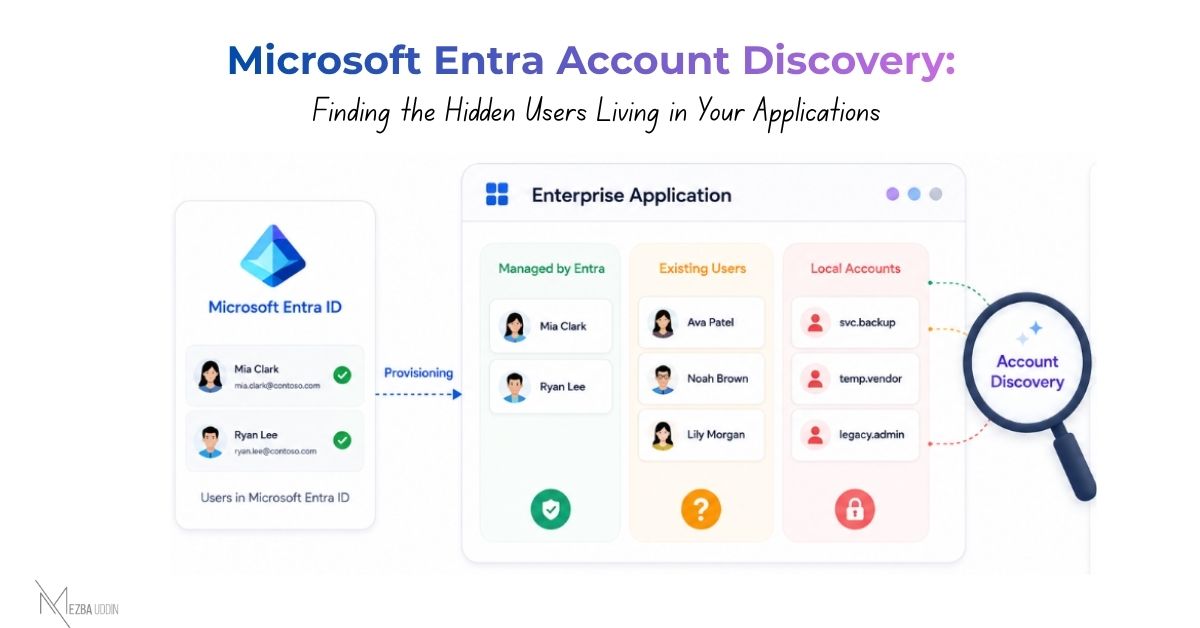
Instead of managing only newly provisioned users, administrators gain visibility into accounts that already exist. The discovery results help identify:
- Users already managed by Microsoft Entra ID
- Existing users that aren’t assigned through provisioning
- Local application accounts that don’t have a matching identity in Microsoft Entra ID
This visibility helps administrators identify unmanaged accounts before expanding provisioning or implementing identity governance policies.
Supported Applications
Account Discovery supports many provisioning-enabled enterprise applications, including:
- Salesforce
- Atlassian Cloud
- SAP Cloud Identity Services
- GitHub Enterprise Cloud
- SCIM-based connectors
- ECMA connectors for on-premises applications
Some applications don’t currently support Account Discovery, including:
- Workday
- SAP SuccessFactors
- ServiceNow
- AWS
- Snowflake
- Cross-tenant synchronization
- Cloud Sync
If discovery doesn’t return any results, verify whether the application supports SCIM pagination.
Prerequisites
Before running Account Discovery, verify the following requirements.
Licensing
Your organization must have either:
- Microsoft Entra ID Governance
- Microsoft Entra Suite
Required Roles
You need one of these administrator roles:
- Application Administrator
- Cloud Application Administrator
- Hybrid Identity Administrator
Provisioning Configuration
The enterprise application must already be configured for provisioning.
Make sure:
- Provisioning credentials are valid.
- The provisioning connector is healthy.
- The test connection completes successfully.
Attribute Mapping
Configure at least one direct attribute match between Microsoft Entra ID and the application.
For example:
- Email → Email
- User Principal Name → Username
Expression-based mappings aren’t supported for Account Discovery.
How to Run Account Discovery
Follow these steps to scan an enterprise application.
- Open the Microsoft Entra admin center and sign in with an administrator account.
- Navigate to: Identity → Applications → Enterprise applications
- Select the application you want to scan.
- From the application menu, select Provisioning.
- Review the provisioning configuration before starting the scan.
- Select Discover identities.
Microsoft Entra ID starts retrieving user accounts from the connected application.
What Happens During Discovery?
Account Discovery connects to the application through the configured provisioning connector and retrieves every available user account.
The scan duration depends on the number of users in the application.
- Small applications may complete within about 30 minutes.
- Applications containing hundreds of thousands of users may take several hours.
The discovery process continues even if you close the browser.
Understanding the Discovery Results
Once the scan completes, Microsoft Entra categorizes discovered accounts into three groups.
Assigned Users
- These users already exist in Microsoft Entra ID and are assigned to the application through provisioning.
- These accounts are already managed through your existing identity lifecycle.
✅ Recommended action: No action is typically required unless you need to review attribute mappings or provisioning settings.
Unassigned Users
- These users exist in Microsoft Entra ID but haven’t been assigned to the application through provisioning.
- Their accounts may have been created manually or before provisioning was enabled.
- Although they belong to known users, they remain outside the current provisioning workflow.
✅ Recommended action: Assign these users to the enterprise application.
After the next provisioning cycle, Microsoft Entra begins managing these accounts through the configured provisioning process.
Local Accounts
Local accounts exist only in the target application and don’t have a matching user in Microsoft Entra ID.
These accounts commonly include:
- Former employee accounts
- Service accounts
- Contractor accounts
- Accounts with incorrect or outdated user information
Because these identities aren’t managed through Microsoft Entra ID, they should be reviewed carefully.
✅ Recommended action: Evaluate each account individually.
Depending on your organization’s requirements, you may:
- Remove unused accounts
- Correct attribute mismatches
- Retain required service accounts
- Investigate unknown accounts before making changes
What Should You Do After Discovery?
Running Account Discovery is only the first step.
Review the results and decide how each account should be managed.
For best results:
- Assign unassigned users to bring them under provisioning.
- Review local accounts and remove or retain them based on business requirements.
- Update incorrect user information where necessary.
- Schedule periodic discovery scans to identify newly created unmanaged accounts.
You can further strengthen identity governance by combining Account Discovery with access reviews, entitlement management, and lifecycle workflows.
Conclusion
Microsoft Entra Account Discovery provides administrators with visibility into user accounts that already exist in enterprise applications before or alongside provisioning.
By identifying assigned users, unassigned users, and local accounts, administrators can understand which identities are already governed and which require further review.
Running Account Discovery before expanding provisioning helps establish a clean identity baseline, reduces unmanaged accounts, and supports a more effective identity governance strategy across enterprise applications.