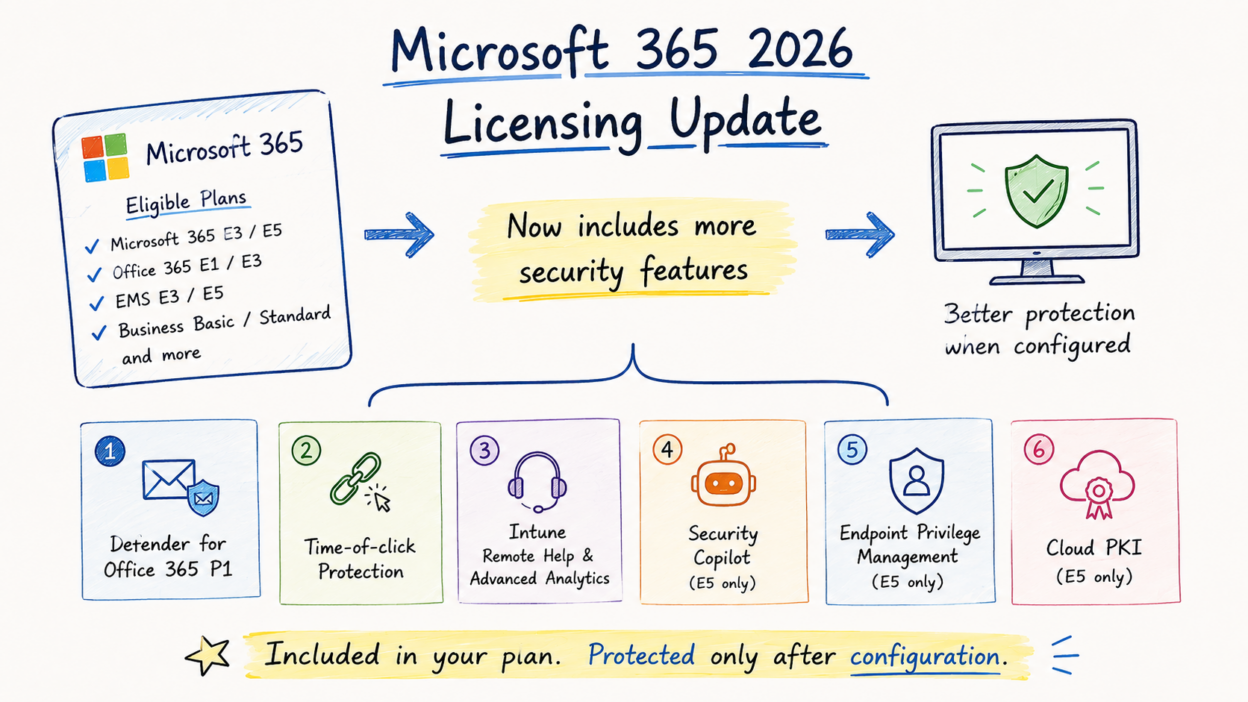
Microsoft’s 2026 Microsoft 365 packaging update is more than a licensing refresh. Several security and endpoint management capabilities that previously required separate licenses are now included with eligible Microsoft 365, Office 365, and EMS subscriptions.
These capabilities will be rolled out to eligible tenants between June and August 2026, with no additional licensing action required.
However, receiving a license doesn’t automatically improve your security posture. Most of these capabilities are not fully configured by default. In many cases, administrators must create policies, assign scopes, and validate configurations before the protection becomes effective.
I will walk through the newly included features and recommend the order in which administrators should deploy them to maximize security value.
1. Configure Microsoft Defender for Office 365 Plan 1 (Office 365 E3 & Microsoft 365 E3)
Organizations using Office 365 E3 or Microsoft 365 E3 without a standalone Defender for Office 365 subscription will now receive Microsoft Defender for Office 365 Plan 1 (P1) as part of their licensing.
This significantly strengthens email and collaboration security by introducing capabilities such as:
- Safe Links
- Safe Attachments
- Anti-phishing protection
- Extended protection for supported Microsoft Teams, SharePoint Online, and OneDrive workloads
After the license becomes available, prioritize the following tasks:
- Configure Safe Links policies to rewrite and evaluate URLs at the time users click them.
- Configure Safe Attachments policies to detonate suspicious files before delivery.
- Review Anti-Phishing policies and enable impersonation protection for executives, privileged accounts, and high-value users.
One important validation step is ensuring that Safe Links policies actually exist and are assigned to users. Tenants that previously relied only on Exchange Online Protection typically won’t have Safe Links policies created automatically. The entitlement may be present, but without a policy, the protection isn’t enforced.
Because email remains one of the largest attack vectors, Defender for Office 365 P1 should be your highest deployment priority after the licensing update.
2. Deploy Time-of-Click URL Protection (Office 365 E1, Microsoft 365 Business Basic & Business Standard)
Organizations receiving the lower-tier security enhancements won’t get the complete Defender for Office 365 experience, but they will gain time-of-click URL protection.
Unlike traditional reputation scanning performed during message delivery, time-of-click protection validates URLs when a user actually opens the link. This helps mitigate attacks where a benign URL is weaponized after the email has already been delivered. After rollout:
- Verify that Safe Links policies are configured.
- Confirm protection applies to both Outlook and Microsoft 365 Office applications.
- Validate policy scope instead of relying on default assignments.
Even though this is a narrower capability than full Defender for Office 365, it significantly reduces exposure to delayed phishing campaigns.
3. Configure Intune Remote Help, Advanced Analytics, and Intune Plan 2 (Microsoft 365 E3 & EMS E3)
Microsoft is also expanding endpoint management capabilities by including Intune Remote Help, Intune Advanced Analytics, and Intune Plan 2 for eligible E3 and EMS E3 subscriptions.
Enable Remote Help first: If your organization still depends on third-party remote administration tools, Remote Help should be one of the first endpoint features you deploy.
Unlike traditional remote-control solutions, Remote Help integrates with Microsoft Entra authentication and Intune, providing stronger identity validation, centralized auditing, and role-based administration. Before production deployment:
- Require user authentication before every remote session.
- Assign access through role-based access control (RBAC).
- Restrict Remote Help permissions to authorized support groups.
- Monitor Remote Help audit logs regularly.
Configure Advanced Analytics next: After Remote Help, configure Intune Advanced Analytics to establish ongoing endpoint health monitoring. Advanced Analytics provides visibility into:
- Application reliability
- Device performance trends
- Startup performance
- User experience metrics
- Hardware and battery health
These insights help administrators identify recurring device issues before they become widespread operational incidents, allowing proactive remediation rather than reactive troubleshooting.
Evaluate Intune Plan 2 capabilities: Intune Plan 2 introduces additional advanced endpoint management capabilities that generally require more planning and policy design. Because implementation is typically broader in scope, it can be scheduled after the foundational Remote Help and Analytics deployment.
4. Plan Microsoft Security Copilot Adoption (Microsoft 365 E5)
Microsoft 365 E5 customers now receive Microsoft Security Copilot, including a monthly Security Compute Unit (SCU) allocation. Each tenant receives 400 SCUs per month for every 1,000 licensed users, up to a maximum of 10,000 SCUs per month. For example:
- A 4,000-seat tenant receives 1,600 SCUs each month.
- Tenants larger than 25,000 licensed users still receive a maximum allocation of 10,000 SCUs.
Before rolling out Security Copilot broadly, identify the operational scenarios that provide the highest return on SCU consumption. Typical high-value use cases include: phishing investigation, incident summarization, threat hunting assistance, and Conditional Access policy analysis.
Also note that several services are billed separately and don’t consume the bundled SCU allocation, including Microsoft Sentinel data storage, non-agentic Microsoft Purview Data Security Investigations, Azure Logic Apps, and third-party Security Store agents.
A controlled rollout with clearly defined use cases helps maximize both operational value and SCU efficiency.
5. Implement Endpoint Privilege Management(Microsoft 365 E5 only)
Many organizations continue to grant users permanent local administrator rights because certain legacy applications require elevated permissions.
Endpoint Privilege Management (EPM) allows organizations to remove persistent administrator access while permitting approved applications to elevate only when necessary. To implement EPM effectively:
- Remove unnecessary users from the local Administrators group.
- Create elevation policies using trusted publisher certificates or file hashes.
- Audit elevation requests before enforcing production policies.
- Review elevation events regularly to identify applications that should be modernized or repackaged.
Reducing standing administrative privileges remains one of the most effective controls for limiting ransomware and malware impact across managed endpoints.
Deploy Microsoft Cloud PKI (Microsoft 365 E5): Microsoft Cloud PKI simplifies certificate lifecycle management for Intune-managed devices and reduces dependence on traditional on-premises PKI infrastructure for supported scenarios. After deployment, admins can:
- Automatically issue certificates during device enrollment.
- Secure Wi-Fi, VPN, and certificate-based authentication.
- Configure automatic certificate renewal.
- Replace legacy PKI deployments where appropriate.
Organizations already managing devices with Intune should evaluate whether Microsoft Cloud PKI can simplify their existing certificate deployment architecture while reducing operational overhead.
Prioritize Configuration Based on Risk
Not every newly included capability should be deployed simultaneously. A practical implementation sequence is:
- Detection and email protection — Configure Defender for Office 365 P1 and time-of-click URL protection first to close immediate phishing and malware exposure.
- Endpoint visibility and secure administration — Deploy Remote Help and Advanced Analytics to strengthen endpoint operations and improve device health visibility.
- Advanced security capabilities — Roll out Security Copilot, Endpoint Privilege Management, and Microsoft Cloud PKI after defining governance, operational processes, and supporting policies.
Following this phased approach reduces the immediate attack surface while allowing sufficient time to plan and operationalize more advanced security capabilities.