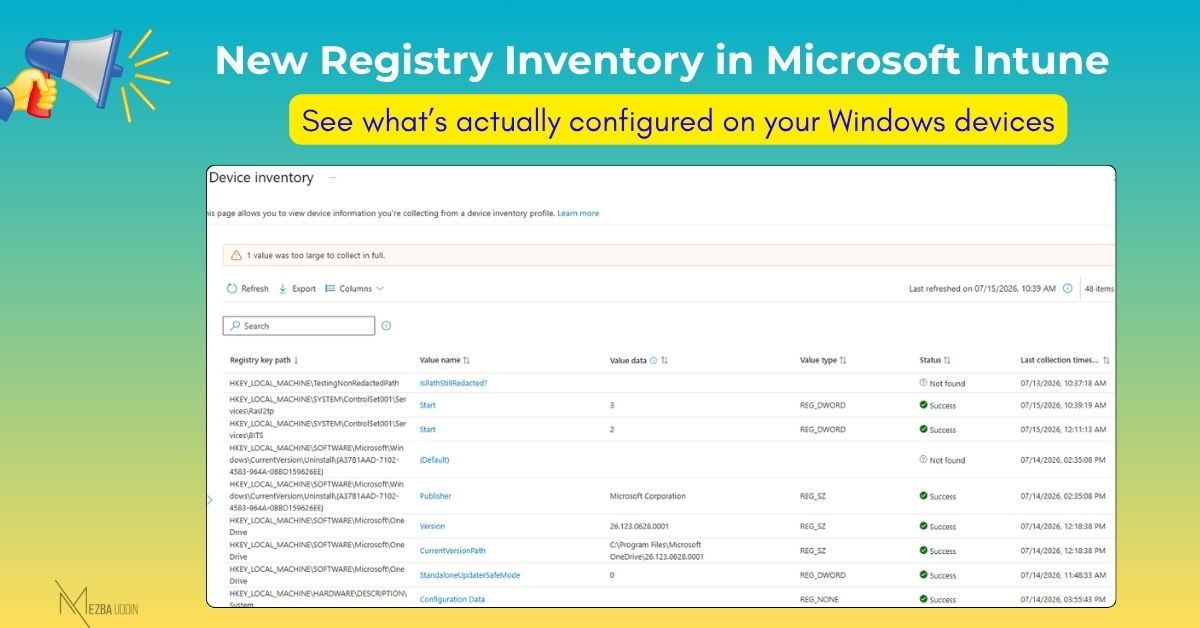
A policy can show as successfully applied in Intune, but that doesn’t always tell you what is actually configured on the Windows device.
Microsoft Intune’s new Registry Inventory capability helps admins verify the configuration directly from the device.
How Registry Inventory Works
With the July 2026 release, Intune can collect Windows registry data through the Properties Catalog and make it available in Device inventory.
Admins can collect:
- A specific registry value
- All values under a registry path
- The same value across subkeys
The collected information includes the registry path, value name, type, and data.
Why It’s Useful
Registry Inventory can help answer common device management questions:
- Did the policy actually apply?
- Is the setting enabled?
- Why is one device configured differently?
- What configuration is currently present?
This can make troubleshooting easier, especially when the Intune policy status doesn’t provide enough detail.
Less Need for Custom Scripts
Previously, admins often had to create custom discovery scripts to collect registry information from Windows devices.
With Registry Inventory, this data can now be collected directly through Intune, reducing the need for scripts for common inventory scenarios.
Current Limitations
Registry Inventory currently supports HKLM registry paths. Microsoft has also added safeguards to prevent potentially sensitive registry values from being collected.
For teams managing Windows devices through Intune, this provides a simpler way to get visibility into the configuration that actually exists on the device.