Data retention has long been a cornerstone of Microsoft 365 compliance. It ensures that important information remains available for legal, regulatory, and organizational needs—even when users attempt to remove it. But as data volumes continue to explode, especially with the rise of AI-powered collaboration, organizations are encountering a different challenge: not every piece of retained data should remain indefinitely accessible.
A sensitive document shared in the wrong location. A Teams transcript containing confidential discussions. A file created during an experiment that later becomes a liability. In situations like these, preserving data can sometimes conflict with reducing exposure.
Until now, content protected by retention policies or holds had very limited paths toward permanent removal. Microsoft is addressing this gap with a new capability in Microsoft Purview Data Lifecycle Management: Priority Cleanup.
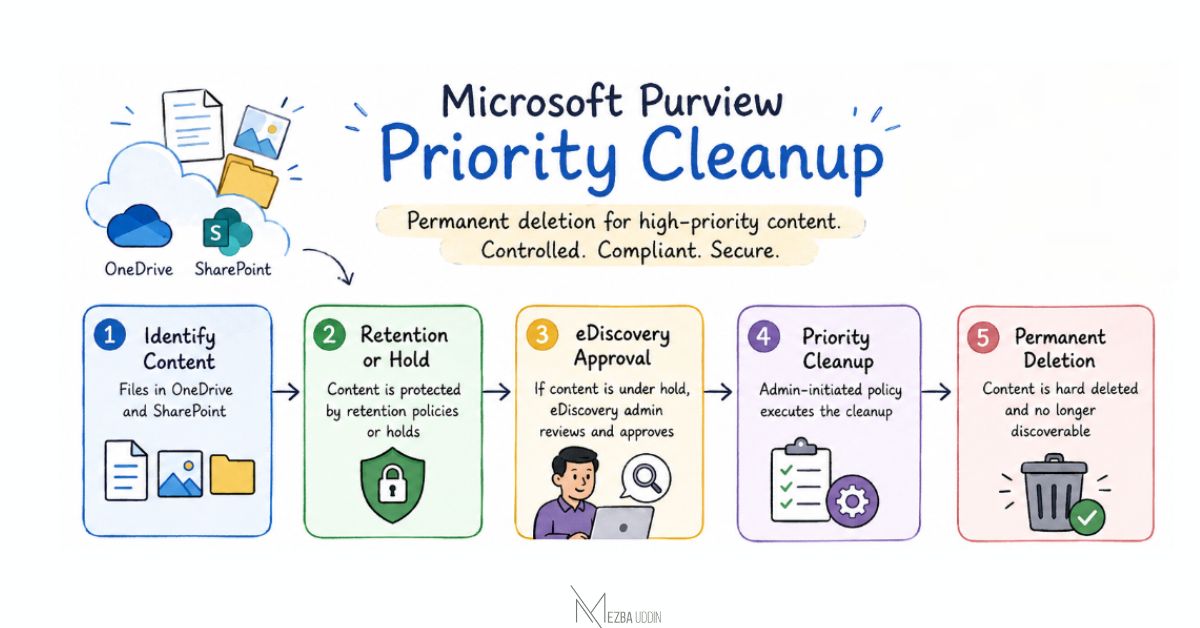
With this new workflow, administrators can permanently remove targeted OneDrive and SharePoint content—even if that content falls under existing retention controls. However, this capability does not weaken compliance boundaries. Instead, Microsoft introduces a structured approval process to ensure that high-priority deletion remains governed and auditable.
Why Traditional Deletion Is Not Always Enough
Deleting a file in Microsoft 365 does not necessarily mean it disappears permanently. Retention policies are designed to preserve content behind the scenes. A user may delete a document from their OneDrive or SharePoint site, yet a preservation copy can still exist because compliance rules require the organization to maintain that information for a specified duration.
This behavior is intentional. It protects organizations against accidental data loss and helps satisfy legal obligations.
However, modern data environments have introduced new scenarios where organizations need the opposite capability—the ability to intentionally and permanently remove specific information that presents unnecessary risk. Consider the growth of AI-generated and AI-consumable content. Microsoft Copilot can interact with organizational data such as documents, meeting artifacts, and collaboration records. The larger the data footprint becomes, the greater the importance of maintaining a deliberate data hygiene strategy.
Priority Cleanup introduces a mechanism to address this challenge without bypassing compliance oversight.
Priority Cleanup in Microsoft Purview Data Lifecycle Management
Priority Cleanup is a new policy-based workflow that allows administrators to identify specific content in OneDrive for Business and SharePoint Online and remove it permanently.
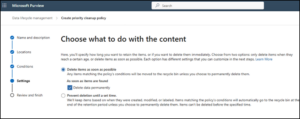
When creating a Priority Cleanup policy, administrators can choose the Delete data permanently option. Once the cleanup operation is completed, the targeted content is hard deleted and no longer appears in:
- SharePoint search results
- Microsoft Copilot experiences
- eDiscovery searches (after required approval processes are completed)
This capability represents a significant change in how organizations can manage high-risk data. Rather than waiting for retention periods to expire, administrators gain a controlled method for removing content that should no longer remain within the environment.
Compliance Is Not Removed from the Equation
A feature capable of deleting retained data naturally raises an important question:
What prevents administrators from removing information that must be preserved?
Microsoft addresses this concern by placing eDiscovery approval at the center of the workflow.
If the targeted content is subject to a hold, the deletion cannot proceed without review and approval from an authorized eDiscovery administrator. This ensures that legal and compliance stakeholders remain involved whenever protected content is considered for permanent removal.
Additionally:
- Priority Cleanup is not enabled automatically.
- Administrators must intentionally create and configure cleanup policies.
- Existing user workflows remain unchanged unless a policy is applied.
The result is a model that combines two seemingly opposite objectives: reducing unnecessary data exposure while maintaining compliance governance.
A New Data Lifecycle Strategy for the Copilot Era
The arrival of generative AI has changed how organizations think about information management.
Previously, the primary concern was often whether enough data was being retained. Today, the conversation has expanded to include whether organizations are retaining the right data and whether outdated or sensitive information continues to provide unnecessary exposure.
This is especially relevant for rapidly growing content sources such as meeting transcripts, collaborative documents, and AI-assisted content creation.
Priority Cleanup adds a missing layer to the lifecycle management journey. Organizations can now classify information into three broad stages:
- Retain data when it is required for business, regulatory, or legal purposes.
- Review data when its value or risk profile changes over time.
- Permanently remove data when it creates exposure and no longer serves a justified purpose.
This approach moves data management from a passive retention strategy toward a more intentional lifecycle model
Preparing Your Microsoft 365 Environment
Before implementing Priority Cleanup, administrators should evaluate both technical and governance requirements.
Start by reviewing existing retention policies, legal holds, and the types of content that may require urgent removal. Establish clear ownership between Microsoft 365 administrators, compliance teams, and eDiscovery administrators so approval paths are well defined.
To configure the feature:
Microsoft Purview Portal → Data Lifecycle Management → Priority Cleanup
Create a new cleanup policy and select Delete data permanently for the required content scope.
Organizations should also update internal compliance documentation to reflect when Priority Cleanup can be used, who can approve requests, and how deletion decisions are tracked.
Final Thoughts
For years, retention has been primarily about making sure information survives deletion. Priority Cleanup introduces the other side of the lifecycle conversation: ensuring that information does not survive longer than it should.
The ability to hard delete OneDrive and SharePoint content—even when retention or holds exist—is a powerful capability. But its real value does not come from deletion alone. It comes from giving organizations a controlled, accountable process to remove high-risk data without dismantling the compliance safeguards designed to protect it.
As Microsoft 365 environments continue to expand with Copilot-generated and collaboration-driven content, features like Priority Cleanup will become increasingly important for maintaining a balance between data availability, compliance obligations, and risk reduction.