The first symptom of this change won’t be an alert or a Message Center banner anyone remembers reading. It will be a help desk ticket that says, “The code never arrived.”
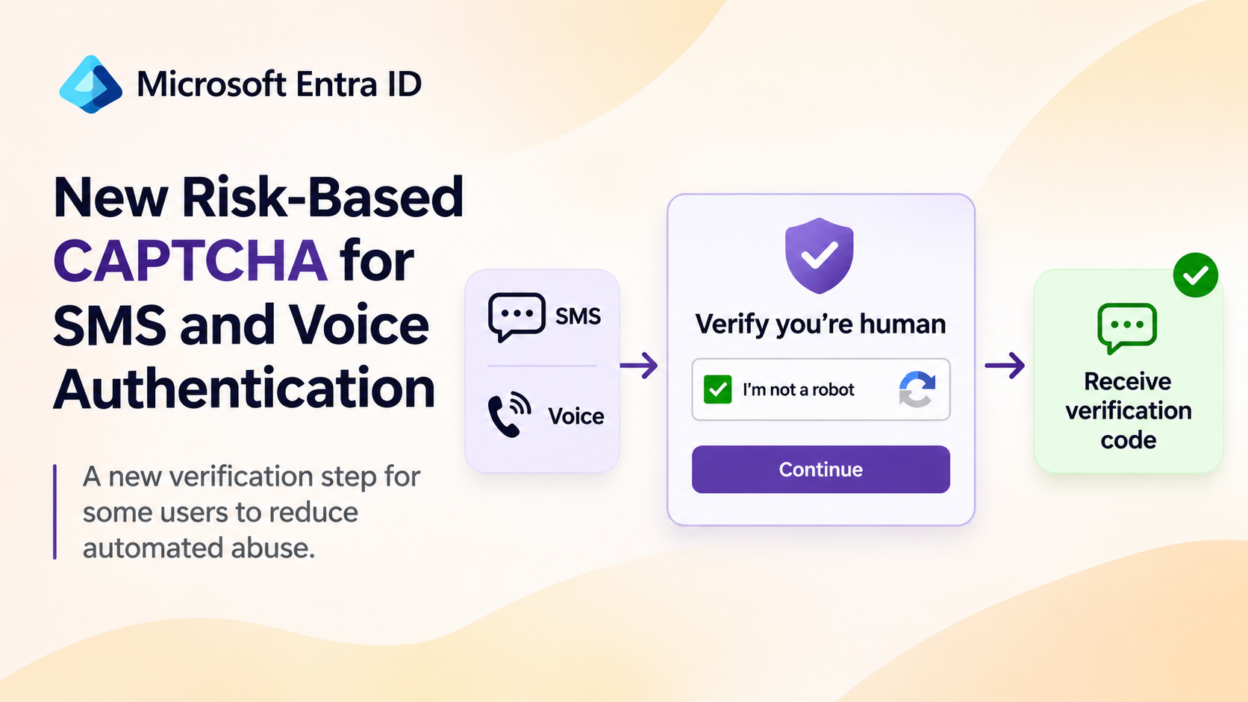
Entra ID is adding a risk-based anti-bot verification (CAPTCHA) step to telephony-based authentication (SMS and voice sign-in) from mid-October 2026.
The update adds a checkpoint before Microsoft sends an SMS authentication code or initiates a voice call. Some users may need to complete a CAPTCHA challenge before proceeding with authentication.
What is Telephony Fraud (IRSF)
SMS and voice authentication are convenient because users receive verification codes through familiar channels. The same convenience gives attackers something to automate.
Consider an attacker who repeatedly starts authentication requests to phone numbers in regions with expensive telecommunications charges. Every request that triggers an SMS or voice call generates a cost. In certain fraud schemes, attackers hold revenue-sharing arrangements with telecom providers and profit from this artificial traffic. The pattern is known as International Revenue Share Fraud (IRSF), and the technique is called traffic pumping.
The damage extends beyond authentication security. Excessive automated requests inflate telecom costs, consume authentication resources, and can degrade the service for legitimate users who depend on phone-based sign-in.
Notably, the attacker never needs to compromise an account. Generating the traffic is the objective. The CAPTCHA targets exactly this gap by requiring a human-verification step before the service sends the code or places the call.
How Microsoft Entra Risk-Based CAPTCHA Works
The new CAPTCHA checkpoint does not replace SMS or voice authentication. It adds a verification step when the risk evaluation decides a request needs further scrutiny.
In a typical SMS sign-in, the user enters their credentials, selects SMS, receives a code, and enters it. With the new checkpoint, the flow may look like this:
- The user initiates sign-in.
- The user selects SMS or voice authentication.
- Entra ID evaluates the authentication request.
- If additional verification is required, a CAPTCHA challenge is displayed.
- The user completes the verification.
- Microsoft sends the SMS code or initiates the voice call.
- The user enters the code and completes authentication.
The CAPTCHA acts as a checkpoint before the telephony service is used. It does not check whether the password is correct or whether the SMS code matches. Its only job is to judge whether the request to start phone-based authentication comes from a human or from an automated process.
There is also a human-factors problem. Security awareness training has taught users to distrust unexpected prompts, so a new dialog in the middle of sign-in will look, to some of them, like exactly what they were warned about. Tell users in advance what the step looks like and that it is expected.
Why Only Some Users See the Entra ID CAPTCHA
A universal requirement would add friction to every phone-based sign-in, including routine ones. The experience is therefore risk-based and driven by client behavior, so not every user or attempt is affected. The design balances two competing needs:
- Prevent automated systems from abusing telephony authentication.
- Avoid unnecessary verification steps for legitimate users.
In practice, two users under the same policy can have different experiences, and the same user can see the challenge one day and not the next. A user who sees the CAPTCHA is not necessarily suspicious. Risk-based verification is not a confirmed account compromise, and a legitimate request can still trigger it.
The announcement does not publish the risk criteria. Avoid assuming that a particular IP address, location, device, or request volume will always trigger the challenge.
How to Prepare Your Tenant for the Entra ID CAPTCHA
The announcement does not describe a tenant-level setting that administrators must enable to activate this safeguard. It is a Microsoft-managed, risk-based control, so the main administrative responsibility is operational readiness rather than policy configuration
- Inform support teams that users may encounter CAPTCHA before receiving SMS codes or voice calls. Update troubleshooting guidance so support staff can distinguish a CAPTCHA loading issue from a delayed or undelivered authentication code.
- Review network readiness
This matters most in environments with strict outbound filtering or TLS inspection. Microsoft identifies Arkose Labs as part of the CAPTCHA experience and provides the following network requirements.
- Allow the required domains: Configure the firewall, proxy, or secure web gateway to allow outbound HTTPS traffic over TCP port 443 to arkoselabs.com and *.arkoselabs.com.
- Add both domain entries: Some products do not match the base domain when a wildcard is configured, so include both entries.
- Check rule order: Ensure DNS filtering and web-content or category filtering do not block these domains. The allow rule should take priority over category-based blocks.
- Review TLS inspection: Bypass TLS inspection for these domains, as Microsoft recommends. HTTPS decryption can prevent the challenge from loading or validating correctly.
- Test restricted networks: Test from your most restricted network environments, such as a branch office, shared-device segment, or locked-down proxy profile. Testing only from head office may miss issues affecting other users.
Remember that the traffic originates from the user’s device. Therefore, the egress path and network restrictions at each site matter.
- Review authentication dependencies
Identify users and applications that depend heavily on SMS or voice authentication. If telephony authentication becomes unavailable to a user, the impact could be greater for those who have limited alternative authentication methods registered.
- Review the authentication methods available to users in the Microsoft Entra admin center.
- Identify users who rely exclusively on SMS or voice authentication, particularly those who may have difficulty registering another method.
- Verify that users have suitable alternative authentication methods registered and can use them to sign in.
- Prioritize users with limited access to alternative devices or authentication methods when planning migration.
- Encourage stronger authentication methods
Where possible, help users move to phishing-resistant methods such as passkeys. This is not just a workaround for the CAPTCHA. It is a broader identity security improvement.
Does Microsoft Entra CAPTCHA Replace MFA or Conditional Access?
This update should not be treated as a new MFA policy.
The CAPTCHA does not replace MFA, Conditional Access, or identity protection controls, because each addresses a different concern.
MFA verifies that a user can satisfy an additional authentication requirement. Conditional Access evaluates whether access should be allowed under configured conditions. The CAPTCHA reduces automated abuse of telephony authentication.
These controls can complement one another, but they are not interchangeable. The CAPTCHA also doesn’t make SMS phishing-resistant. It shows that a request probably came from a person, and it says nothing about whether that person owns the account.
Difference Between Entra CAPTCHA and SMS Authentication Retirement
If Microsoft is already planning to retire Microsoft-provided SMS and voice authentication, why introduce another checkpoint for these methods now?
Because the two changes serve different purposes and run on different timelines:
- The CAPTCHA protects the telephony channel while it is still running. It adds a checkpoint against automated abuse and does not remove SMS or voice.
- The retirement decides how long Microsoft-provided telephony authentication will exist. Delivery retires on February 1, 2027 for most users, and on July 1, 2027 for Global Administrators and external users.
In practice, run them as two workstreams. The CAPTCHA is a one-time network task for the team that owns the firewall and proxy. The retirement is an identity migration program with its own owner, timeline, and user communications. Mixing them is how organizations end up fixing proxy rules for a method they should already be moving users away from.
The sharper test of readiness is not whether SMS works today. It is what a user with no other registered method sees on the morning their retirement date passes.