For years, getting the best of Microsoft Intune meant paying extra. Features like Remote Help, Advanced Analytics, Endpoint Privilege Management, and Cloud PKI sat behind the Intune Suite add-on, a separate purchase that many organizations skipped due to cost. That changes in 2026.
Microsoft’s latest 2026 Microsoft 365 packaging announcement introduced several major Intune-related additions. Selected Intune Suite capabilities will be folded directly into Microsoft 365 E3 and E5, rolling out starting mid-June 2026 and completing by August 1, 2026. I
While the announcement includes security and Exchange Online enhancements, the Intune-related updates deserve separate attention because Microsoft is gradually turning advanced endpoint management capabilities into more standard Microsoft 365 features instead of premium add-ons.
Intune is Expanding Beyond Traditional Device Management
For years, many organizations primarily used Microsoft Intune for:
- Device enrollment
- Compliance policies
- Conditional Access integration
- Basic app deployment
- Mobile device management
But Microsoft is now positioning Intune as a broader endpoint security and enterprise management platform. The latest announcement adds several advanced capabilities to Microsoft 365 and EMS packaging, including:
- Intune Remote Help
- Intune Advanced Analytics
- Intune Plan 2 capabilities
- Endpoint Privilege Management
- Microsoft Cloud PKI
- Enterprise Application Management
- Tunnel for Mobile Application Management (MAM)
This is one of the largest Intune capability expansions included within Microsoft 365 packaging in recent years.
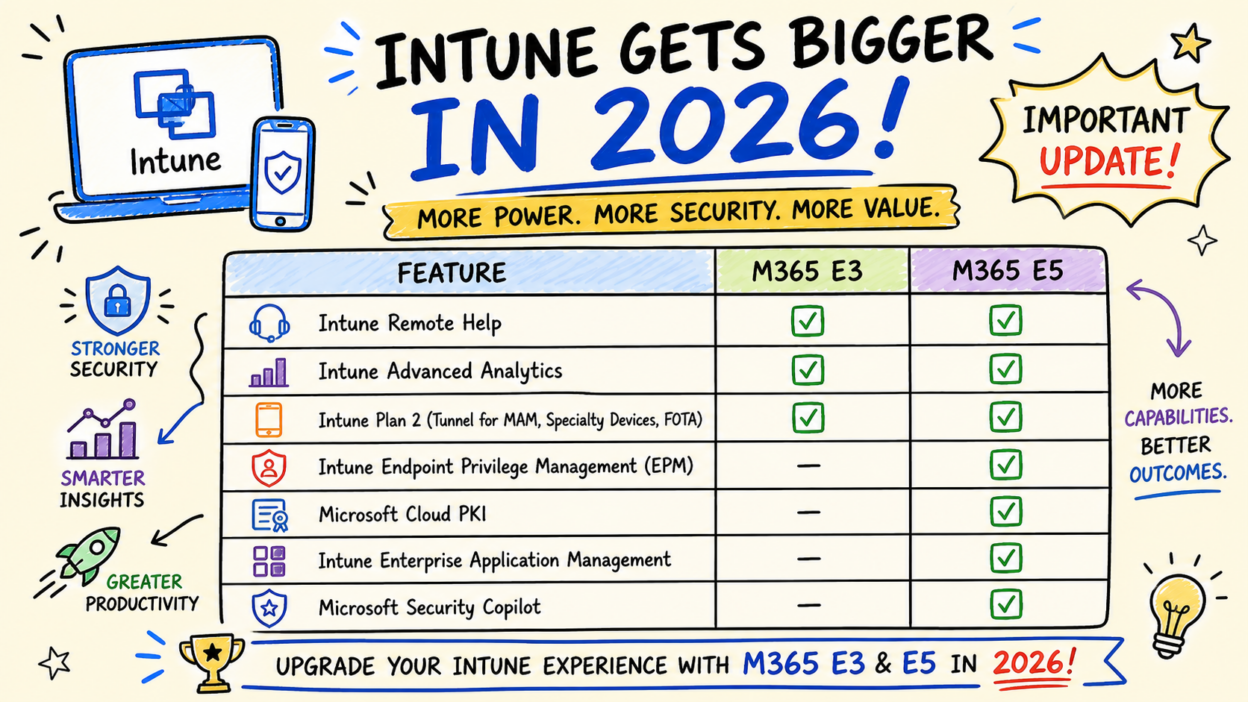
What’s Coming to Your Plan:
| Feature | Microsoft 365 E3 | Microsoft 365 E5 |
| Intune Remote Help | ✅ | ✅ |
| Intune Advanced Analytics | ✅ | ✅ |
| Intune Plan 2 (Tunnel for MAM, Specialty Devices, FOTA) | ✅ | ✅ |
| Intune Endpoint Privilege Management (EPM) | — | ✅ |
| Microsoft Cloud PKI | — | ✅ |
| Intune Enterprise Application Management | — | ✅ |
| Microsoft Security Copilot | — | ✅ |
All features roll out mid-June 2026, completing by August 1, 2026. Features are provisioned but not configured by default — admin action required to deploy.
Intune Remote Help
Remote troubleshooting has always been a challenge for distributed and hybrid work environments. Many organizations still rely on third-party tools for remote support because traditional endpoint management platforms lack integrated remote assistance capabilities.
Microsoft is now including Intune Remote Help, which allows authorized support staff to remotely assist users securely.
It gives IT a role-based, fully auditable remote assistance tool that requires strong authentication and checks device compliance before a session is established. Every interaction is logged, timestamped, and tied to identity. For organizations under any regulatory framework, that audit trail alone is worth the feature.
Intune Advanced Analytics
Most endpoint issues surface as support tickets after something breaks. Intune Advanced Analytics shifts that dynamic.
It uses AI-powered anomaly detection to proactively flag device health issues, compliance drift, and digital friction before they escalate.
For teams that aren’t fluent in KQL, Copilot in Intune lets admins write complex queries using plain language, which makes the analytics layer accessible beyond just the senior engineers on your team.
Intune Plan 2 — Tunnel for MAM, Specialty Devices, and FOTA
Intune Plan 2 bundles three distinct capabilities that often get overlooked in day-to-day management but matter enormously at scale.
- Tunnel for Mobile Application Management
- Specialty device management
- Firmware over-the-air (FOTA) updates
- Tunnel for Mobile Application Management provides secure, per-app VPN connectivity to corporate resources — without requiring the device to be enrolled. This is particularly useful for BYOD scenarios where full enrollment isn’t practical or welcome, but you still need to ensure corporate apps are accessing internal resources over a protected channel.
- Specialty device management extends Intune’s management reach to AR/VR headsets, smart screens, and certain meeting room systems. As device inventories grow more diverse, having these under the same management plane as your standard Windows and mobile fleet reduces operational overhead significantly.
- Firmware over-the-air (FOTA) updates for supported Zebra devices allow IT to push firmware updates remotely without physical access — a practical necessity for warehousing, logistics, and retail environments where Zebra devices are common and distributed across locations.
Intune Endpoint Privilege Management (EPM)
This is arguably one of the most impactful additions!
Local admin rights on endpoints remain one of the most exploited attack vectors in enterprise environments. According to Microsoft’s Digital Defense Report 2025, 79% of ransomware attacks in 2025 involved remote management tools on endpoints, which is a direct consequence of overprivileged accounts.
EPM enforces a least-privilege model with just-in-time elevation. Instead of granting persistent local admin access, users can request elevated permissions for specific approved applications or tasks, and those elevations are time-bound and logged. For IT, Copilot in Intune can pull in Microsoft Defender threat intelligence to assess an application’s risk level before the elevation is approved — so decisions aren’t made blindly.
Microsoft Cloud PKI
On-premises PKI infrastructure is one of those things that works until it becomes a serious liability — certificate sprawl, manual renewal processes, dependency on aging servers.
Cloud PKI moves the entire certificate lifecycle to the cloud with a few-clicks provisioning model.
It introduces cloud-based certificate lifecycle management integrated with Intune. It handles issuance, renewal, and revocation, and supports certificate-based authentication for Wi-Fi and VPN. That last part matters: certificate-based authentication is meaningfully more phishing-resistant than password-based auth, and getting organizations off password-dependent network access has been a persistent Zero Trust gap. Cloud PKI makes closing it operationally realistic without standing up new on-premises infrastructure.
Organizations that previously depended on complex on-premises PKI infrastructure may now explore more cloud-native certificate management approaches.
Intune Enterprise Application Management
Application deployment is another area Microsoft is improving aggressively! Application deployment and patching is one of the most time-consuming parts of endpoint management, and it’s where unpatched vulnerabilities tend to accumulate.
Enterprise Application Management addresses this with a curated catalog of over 1,000 pre-packaged Win32 applications, each with preconfigured deployment settings. The goal is to reduce the manual effort of repackaging, testing, and deploying third-party software at scale.
On the E5 side, the Vulnerability Remediation Agent (Security Copilot in Intune) connects patch prioritization to actual threat intelligence. Rather than working through a flat list of CVEs, IT gets context on what’s being actively exploited and which devices are exposed — so remediation effort goes to the highest-risk gaps first.
Microsoft Security Copilot in Intune
Security Copilot’s integration with Intune puts AI directly into security workflows rather than treating it as a separate research tool. At Microsoft Ignite 2025, Microsoft announced a new wave of Security Copilot agents in Intune — including the Vulnerability Remediation Agent — that can surface risks, suggest actions, and help automate complex tasks across the endpoint management surface.
For E5 customers, Security Copilot will activate with a 30-day Message Center notice before it becomes live in the tenant.
Before You Do Anything, Read This
Capabilities that organizations either paid extra for or went without are now part of the base plan. For IT teams that have been running lean on tooling, the gap between what they had and what they needed just got smaller.
That said, provisioning is not the same as protection. None of these Intune features turn on automatically. Remote Help, Advanced Analytics, EPM, Cloud PKI, and Enterprise App Management — all of them require deliberate configuration before they do anything for your environment. The rollout window gives you room to prioritize, but it shouldn’t be treated as a runway to delay.
The organizations that get the most out of this update will be the ones that go in with a plan — knowing which features address their current gaps, which need policy design before deployment, and which can be phased in over time. If you’ve been wanting to move toward a least-privilege endpoint model or get off on-premises PKI, there’s no better time to start that conversation internally than now.