If your organization relies on Microsoft Entra Custom Controls to integrate third-party MFA providers such as Duo or RSA, it’s time to start planning for a transition.
Microsoft has announced that Custom Controls will be retired on September 30, 2026, with the feature reaching end of life in May 2027.
Organizations using this capability should begin evaluating alternatives well before the retirement date to avoid disruptions to their authentication workflows.
The recommended replacement is External MFA, which offers tighter integration with Conditional Access and a more standards-based approach to third-party authentication.
Custom Controls in Entra ID
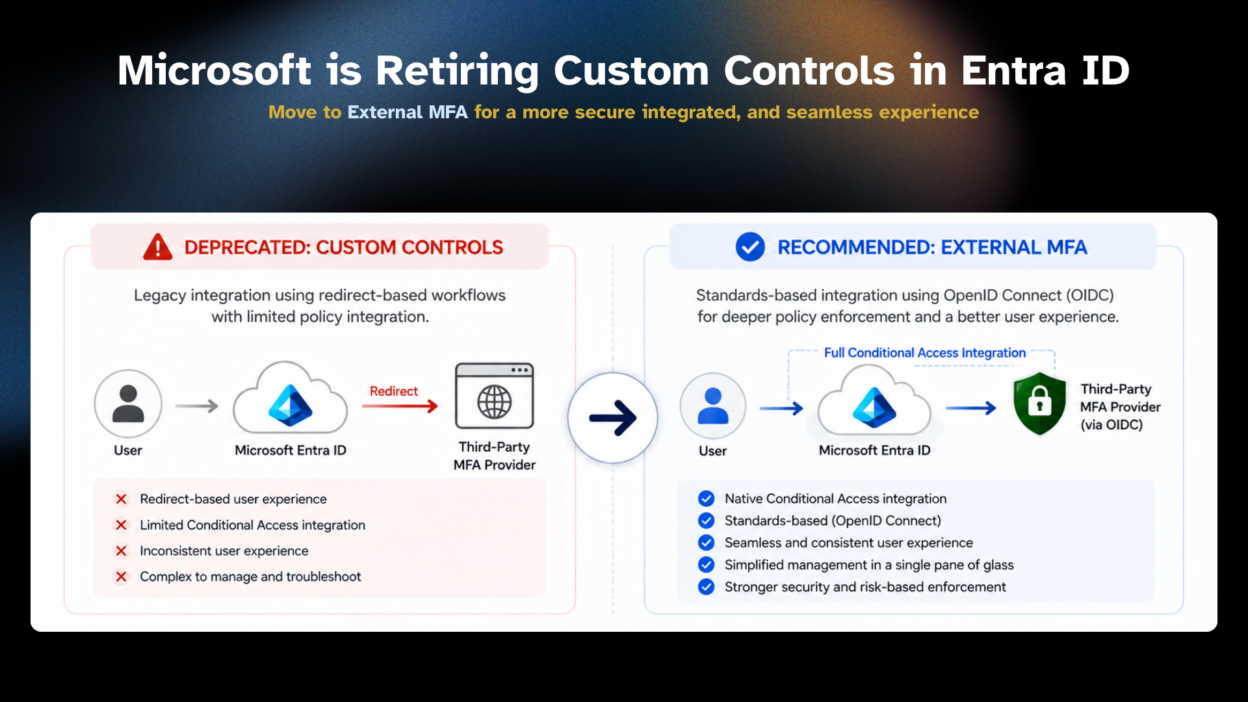
Custom controls were essentially a workaround. It was introduced to enable organizations to integrate third-party multifactor authentication (MFA) providers into the sign-in process. Instead of relying solely on Microsoft’s native authentication methods, organizations could redirect users to an external authentication service to complete additional verification before granting access.
This approach provided flexibility for organizations with existing investments in external identity solutions. However, it relied on redirect-based authentication flows and operated outside the core Conditional Access evaluation pipeline, which limited its integration with newer identity protection capabilities.
To address these limitations, Microsoft is replacing Custom Controls with External MFA, a modern framework designed for deeper interoperability and policy enforcement.
Reason for the Deprecation of Custom Controls
Identity security requirements have evolved significantly, and Microsoft is aligning its authentication model with modern standards and architectures.
While Custom Controls enabled third-party MFA integrations, they functioned as loosely coupled extensions rather than native components of the Conditional Access framework. This design introduced additional complexity in authentication flows and limited Microsoft’s ability to provide a unified security experience.
External MFA addresses these challenges by integrating third-party authentication providers more directly into Microsoft Entra’s identity platform, enabling stronger policy enforcement and a more consistent sign-in experience.
Why External MFA in Entra is the Preferred Alternative
External MFA is what Custom controls should have been from the start. It’s built on OpenID Connect (OIDC), a well-established, standards-based protocol, so the integration between Entra ID and your third-party MFA provider is tighter and more trustworthy.
Unlike the legacy Custom Controls model, External MFA participates directly in Conditional Access processing instead of relying on separate redirect mechanisms.
This allows organizations to maintain their preferred MFA provider while benefiting from Microsoft’s native identity security capabilities. The result is a more secure, maintainable, and predictable authentication architecture.
Key Benefits of External MFA
- Authentication requests continue to pass through the Conditional Access engine, ensuring that sign-in risk, session controls, authentication strength requirements, and policy evaluations are applied consistently, regardless of the external MFA provider being used.
- By leveraging OpenID Connect, External MFA replaces proprietary integration patterns with an industry-standard protocol that simplifies interoperability and improves long-term compatibility.
- Administrators can manage external authentication methods alongside native Microsoft authentication configurations within the Entra ecosystem, reducing operational complexity and simplifying policy administration.
- External MFA provides a more streamlined sign-in process by minimizing unnecessary redirects and delivering a more consistent authentication journey. This can reduce user confusion and lower help desk volume related to sign-in issues.
A Practical Migration Checklist
Organizations currently using Custom Controls should begin migration planning as early as possible. Recommended steps include:
- Review all Conditional Access policies that reference Custom Controls.
- Identify applications and authentication flows dependent on third-party MFA integrations.
- Verify that your MFA provider supports Microsoft Entra External MFA.
- Validate authentication scenarios in a pilot environment before production rollout.
- Test user experiences across supported devices and applications.
- Complete migration activities well in advance of the September 2026 retirement deadline.
Following these steps gradually can make the transition much smoother than attempting a last-minute migration.
This change is about more than replacing one feature with another. It reflects a broader direction toward standards-based identity security, tighter Conditional Access integration, and improved user experiences.
If your environment still depends on Custom Controls, assess your setup and build a migration plan. Waiting until the feature is retired may leave little room for testing or troubleshooting.