Microsoft is fundamentally transforming how organizations manage change in Microsoft 365. After years of feedback from IT administrators struggling to balance innovation with stability, Microsoft has introduced a modernized change management framework that gives you unprecedented control over when and how updates reach your organization.
If you’re managing Microsoft 365, this change affects you directly. Here’s everything you need to know.
The New Change Management Model
Microsoft’s modernized change management model introduces three fundamental improvements:
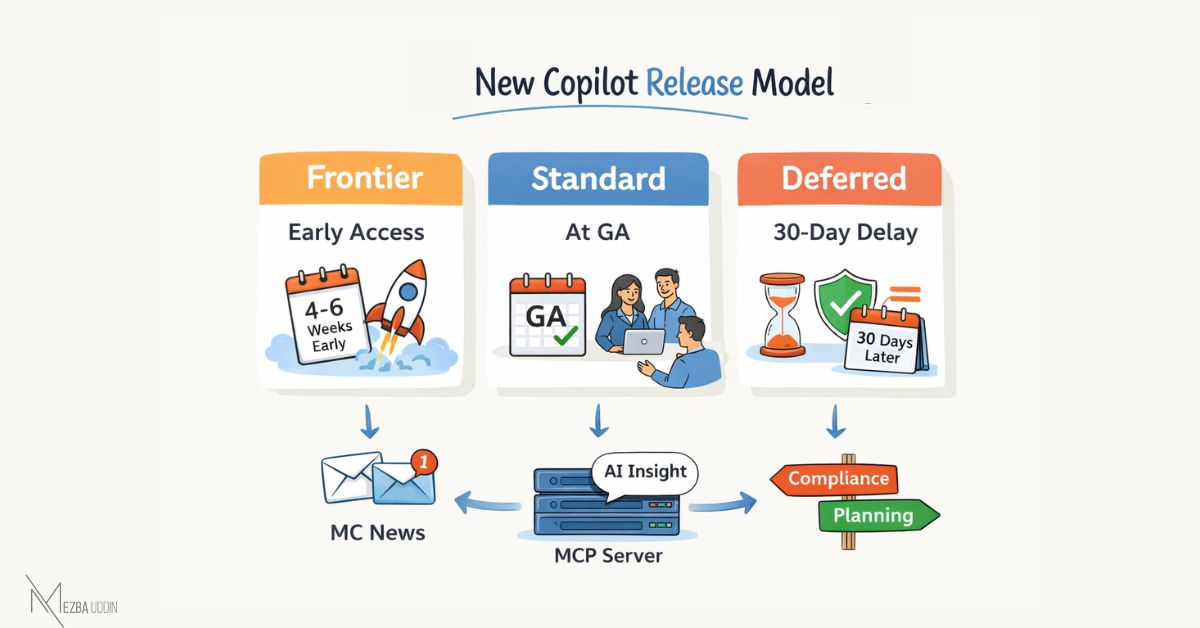
- Flexible Release Audiences: Three distinct channels (Frontier, Standard, Deferred) that align with operational readiness
- Enhanced Communications: Structured Message center posts with clearer impact assessments and required actions
- AI-Powered Insights: MCP Server integration enabling natural language queries about upcoming changes
The Three Release Audiences Explained
Frontier Program
What It Is: Early access to features before general availability, designed for experimentation and feedback.
Who It’s For:
- Organizations with dedicated pilot groups
- Early adopter companies wanting competitive advantage
- Partners needing to prepare training materials before GA
- IT teams with robust rollback procedures
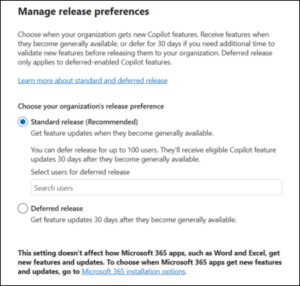
Standard Release (Default)
What It Is: Immediate access to features at general availability—the balanced choice for most organizations.
Who It’s For:
- Organizations without strict regulatory requirements
- Companies prioritizing innovation and competitive features
- IT teams with agile change management processes
- The majority of Microsoft 365 customers
Deferred Release
What It Is: 30-day delay for eligible major features, providing additional time for security and compliance review.
Who It’s For:
- Regulated industries (healthcare, finance, government)
- Organizations with extensive compliance requirements
- Companies with complex change advisory boards
- Enterprises needing time for internal testing and documentation
Understanding the Rollout Timeline
- Mid-April 2026: New release preference options become available in Microsoft 365 Admin Center
- Late April 2026: Full rollout completion, all organizations can configure preferences
- Late May 2026: Microsoft begins honoring release preferences for Microsoft 365 Copilot features
- Future: Additional Microsoft 365 workloads will adopt this model (roadmap TBD)
What “Late May Implementation” Means
This is crucial to understand: The settings become available in April, but they won’t affect anything until late May.
From late May onwards:
- Copilot feature updates will respect your configured release audience
- Other M365 workloads continue under the existing model temporarily
- Microsoft will gradually expand coverage to additional services
How to Choose the Right Release Audience
Use this decision tree to determine your organization’s optimal release audience:
Start Here: Do you operate in a regulated industry with strict compliance requirements?
- YES → Consider Deferred Release
- NO → Continue to next question
Do you have dedicated resources for testing and validating new features before production deployment?
- YES → Consider Frontier for pilot groups + Standard/Deferred for production
- NO → Continue to next question
Is your organization’s competitive advantage tied to leveraging the latest technology?
- YES → Standard Release
- NO → Continue to next question
Does your change management process require 30+ days for review and approval?
- YES → Deferred Release
- NO → Standard Release (default)
Enhanced Message Center Communications
In addition to the above, Microsoft is also restructuring Message center announcements to be more actionable. Every post now includes structured sections for impact assessment (who’s affected, severity), required actions (tasks, deadlines, dependencies), compliance considerations, and timeline clarity (rollout dates, deprecation deadlines).
Set up automated routing:
- “Action Required” → Change management queue
- “Compliance” tag → Legal/compliance team
- Specific workloads → Product owners
- Critical severity → Immediate escalation
Create response workflows: For each message type, document who reviews it, approval timeline, and implementation owner.
Track dependencies: New Message center posts explicitly call out prerequisites. Example: A Copilot feature requiring Teams Premium licenses, SharePoint configuration, and consent policy updates will list all three dependencies upfront—helping you sequence implementation correctly.
Step-by-Step Configuration Guide
Prerequisites: Global Admin or Service Admin role, stakeholder alignment on release strategy.
Microsoft 365 Admin Center → Settings > Org settings > Organization profile > Release preferences
Choose Your Release Audience:
- Frontier Program: Accept terms, define pilot group, save
- Standard Release (Default): No configuration needed—features arrive at GA
- Deferred Release: Select option, review eligible features list, save (security updates NOT deferred)
Optional: User-Level Overrides
For hybrid strategies (pilot groups, executive early access):
Users > Active users > Select users > Manage product licenses > Apps > Override release preference
Frequently Asked Questions
Q: Is this mandatory, or can I ignore it and keep my current settings?
A: If you take no action, you’ll default to Standard release, which is the same as the current standard update cadence. However, you’re missing an opportunity to optimize for your organization’s needs. The new model offers more flexibility, so it’s worth evaluating whether Frontier or Deferred better aligns with your operations.
Q: Will this cost extra?
A: No. Release audience options are included with your existing Microsoft 365 subscription. MCP Server access is also included—both the public MRC server and the Enterprise version use your existing Graph API entitlement.
Q: Can I change my release preference after configuring it?
A: Yes. You can change your release audience at any time through the Admin Center. Changes typically take effect within 24 hours, but won’t retroactively affect features already rolled out.
Q: What happens if I switch from Deferred to Standard mid-month?
A: You’ll begin receiving new features at GA moving forward. Features that were deferred before your switch will complete their 30-day deferral on the original timeline. You won’t suddenly receive a flood of previously deferred features.