If you’ve spent any real time in Microsoft Purview, you know the pain: you’ve configured sensitivity labels, you’ve built out DLP policies, maybe you’ve even enabled auto-labeling — and then leadership asks “so, is our data actually protected?” and you open a dozen Activity Explorer tabs, export a few CSVs, and hope the story holds together.
That stops with Posture Reports. After working with these in production environments, here’s my honest take on what they do, where they shine, and what you should know before you lean on them too hard.
Purview Posture Reports: What problem does this actually solve?
The classic Purview reporting experience is event-driven. Alert fired. User triggered a rule. Policy matched. That’s all useful, but it answers “what happened?” — not “are we actually safe?”
Posture Reports flip that. They’re designed to answer a different question entirely: are our controls consistently applied and enforced across the org? That’s the question your CISO is asking, your auditors are asking, and frankly, it’s the question you should be asking yourself before Copilot starts summarising documents your DLP policies haven’t touched yet.
The reports you’ll actually use
There are six out-of-box reports split between Information Protection and DLP. Here’s how I’d describe each one in plain language:
Your baseline. How much of your data estate is labeled, and how is it being labeled — manually, automatically, or by default? This is the first thing I check when onboarding a new tenant or after a label taxonomy change. High unlabeled volume in SharePoint or Exchange is a red flag that should immediately direct your auto-labeling expansion.
This one’s specifically for deciding which auto-labeling policies are ready to move from simulation mode to enforcement. If a policy has been running in sim for two weeks and the false positive rate looks clean, this report gives you the evidence to make that call confidently. It also shows you which sensitive info types are still under-protected — a useful input for policy tuning conversations.
This is your early warning system. Label downgrades — especially manual ones — are often the first sign of oversharing, accidental exposure, or insider risk. The report shows you who’s downgrading, what they’re downgrading to, and whether it’s happening via manual user action or some automated process. A spike in manual downgrades from a small group of users is the kind of thing that warrants a conversation with your insider risk team.
Before you escalate a user to HR or security, this report helps you distinguish between genuine risky behaviour and a broken workflow. Repeated DLP triggers from the same user could mean they’re exfiltrating data — or it could mean your policy scope is too broad and catching a legitimate business process. Either way, you need the data to make that call.
If you’ve ever had a DLP admin tell you “the alerts are too noisy,” this is where you start. High-volume rules that aren’t generating protective actions are either misconfigured or mis-scoped. High-volume rules that are generating actions? Those are your most valuable policies — protect them from being turned off during the next round of “DLP cleanup.”
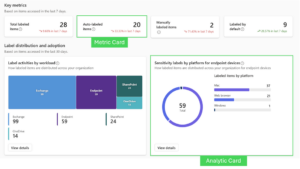
The metric card vs. analytic card distinction matters
The OOB reports are built from two card types, and understanding the difference helps you interpret what you’re looking at:
- Metric cards: Single KPI + trend. Best for “is this improving or declining?” questions — label coverage, auto-labeled item counts, total protective actions.
- Analytic cards: Charts and breakdowns. Better for “where is the problem?” — distribution by workload, top users by trigger count, label transitions over time.
When building a CISO-ready readout, I lean on metric cards for the headline numbers and analytic cards for the supporting narrative. Together they tell a complete story without requiring the audience to interpret raw logs.
Three real-world scenarios where these save time
1. Rolling out sensitivity labels org-wide
You’re three months into a label rollout and leadership wants to know if it’s working. Previously this meant pulling Activity Explorer data, filtering by date, exporting, and building a pivot table. Now you open the label distribution report, note the trend on auto-labeled items, check the label change report for downgrade spikes, and you have your quarterly narrative in about 10 minutes. The “labeled vs. unlabeled by workload” view also tells you exactly where to focus your next auto-labeling policy expansion.
2. DLP tuning before your next policy review
Most orgs I’ve seen have DLP policies that haven’t been meaningfully reviewed in 18 months. The “most triggered rules” report gives you a ranked list of what’s actually firing in your environment — which is usually quite different from what someone assumed would fire when the policies were written. Use it to consolidate overlapping rules, retire irrelevant ones, and justify enforcement mode for the policies that are clearly catching real risk.
3. Prepping for a Copilot rollout
Copilot summarises and surfaces content at scale. If your labeling coverage is patchy and your DLP policies have gaps, Copilot will helpfully surface that unprotected data to whoever asks for it. Posture Reports give you a defensible pre-Copilot baseline — and more importantly, they show you exactly where to close gaps before you flip the switch.
What’s next: Custom Posture Reports and AI-assisted insights
The OOB reports cover a lot of ground, but they’re built for the average org — and your environment probably isn’t average. Custom Posture Reports, now in public preview, let you build scenario-specific dashboards from scratch using drag-and-drop sections and cards, with flexible filters to scope down to a specific label, workload, or sensitive info type.
Think of it as Posture Reports that actually speak your org’s language — whether that’s a financial data risk view for your auditors, a Confidential label adoption tracker for your CISO, or a DLP effectiveness summary tied to your specific regulatory requirements. And layered on top of all of it, AI-assisted report summarisation is on the way — turning your posture data into an executive narrative, complete with key findings, distribution breakdowns, and prioritised recommendations, without you having to write a word of it.
Bottom line
Posture Reports won’t replace your deeper forensic work in Content Explorer or Activity Explorer for investigations. What they do — and do well — is give you a repeatable, defensible view of whether your controls are actually working at scale. That’s a different job, and it’s one that was genuinely hard to do before without stitching together multiple exports.
If you’re doing a label rollout, prepping for Copilot, or just trying to give your security leadership something more meaningful than “the policies are configured,” start here. The hourly refresh cadence and the executive-ready format mean you can turn this into a standing agenda item in your monthly security review without building anything custom.