𝐌𝐢𝐜𝐫𝐨𝐬𝐨𝐟𝐭 𝐄𝐧𝐭𝐫𝐚 𝐩𝐚𝐬𝐬𝐤𝐞𝐲 𝐨𝐧 𝐖𝐢𝐧𝐝𝐨𝐰𝐬 𝐣𝐮𝐬𝐭 𝐡𝐢𝐭 𝐩𝐮𝐛𝐥𝐢𝐜 𝐩𝐫𝐞𝐯𝐢𝐞𝐰
And it’s solving a problem many of us didn’t realize we had.
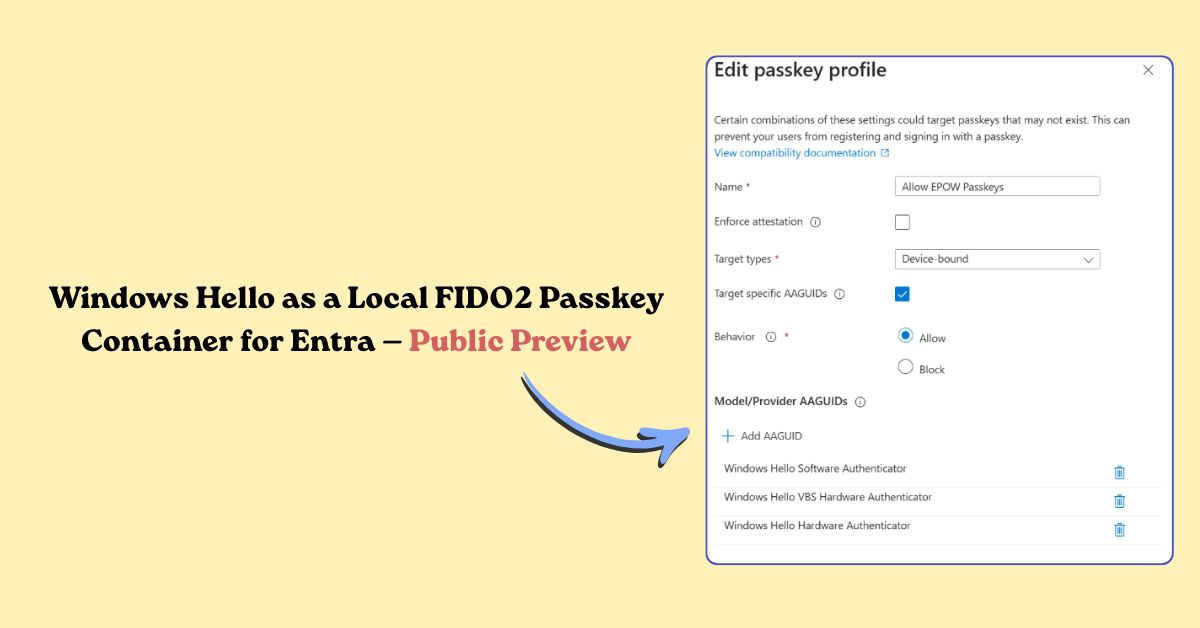
You can now 𝐫𝐞𝐠𝐢𝐬𝐭𝐞𝐫 𝐅𝐈𝐃𝐎2 𝐩𝐚𝐬𝐬𝐤𝐞𝐲𝐬 𝐝𝐢𝐫𝐞𝐜𝐭𝐥𝐲 𝐢𝐧𝐭𝐨 𝐖𝐢𝐧𝐝𝐨𝐰𝐬 𝐇𝐞𝐥𝐥𝐨 without joining or registering the device to Microsoft Entra ID. Windows Hello becomes a local FIDO2 passkey container.
This means:
• No device join required
• Multiple passkeys for multiple Entra accounts on the same PC
• Standards-based phishing-resistant auth
• Governed by Entra passkey (FIDO2) policies, not Intune WHfB policies
Finally: passwordless that works on devices you don’t own.
⚠️ Note: Requires explicit opt-in via passkey profiles with Windows Hello AAGUIDs during preview.
Details: https://learn.microsoft.com/en-us/entra/identity/authentication/how-to-authentication-entra-passkeys-on-windows