
Microsoft Teams PowerShell Is Switching to WAM Authentication by Default
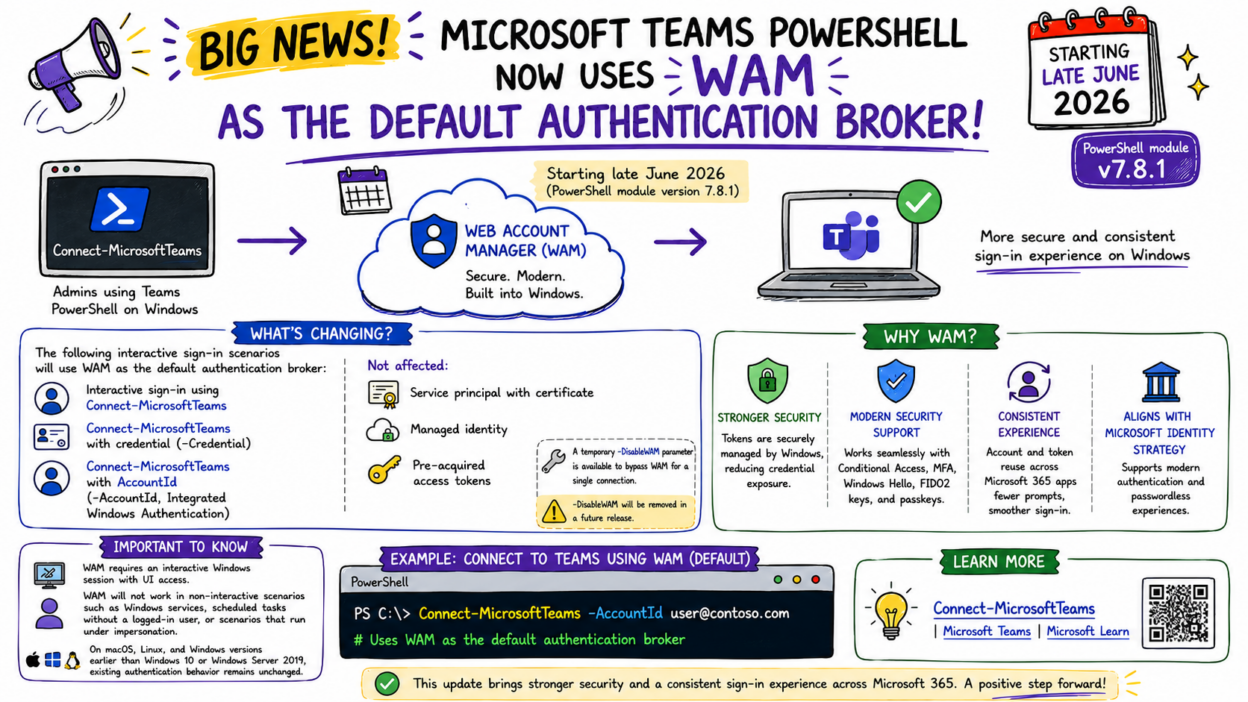
Starting in late June 2026 with version 7.8.1, Connect-MicrosoftTeams will use Web Account Manager (WAM) as its default authentication broker on Windows.
This marks an important step toward modernizing and securing PowerShell authentication. There are several compelling security benefits behind this change.
Traditionally, PowerShell authentication has often relied on embedded browser experiences or legacy authentication mechanisms. With WAM, Teams PowerShell can leverage the same authentication framework built into Windows and used across Microsoft 365 applications.
- Teams PowerShell WAM operates as a system-level broker, which means tokens are issued and managed by Windows itself rather than being stored within the application process. This reduces the attack surface for token theft.
- WAM also enforces Conditional Access policies at the OS level and integrates directly with Windows Hello and device compliance checks. This makes it far better aligned with Zero Trust principles than the legacy MSAL interactive authentication flow.
- Users can benefit from account and token reuse across Microsoft applications, reducing repeated authentication prompts.
- WAM also aligns Teams PowerShell with Microsoft’s broader strategy around modern authentication and passwordless sign-in experiences.
Interactive sign-in, -Credential, and -AccountId (IWA) all move to WAM. However, authentication methods such as service principals with certificates, managed identities, and pre-acquired access tokens remain unchanged.
One key limitation is that WAM requires an interactive Windows user session with UI access. It is not supported in Windows services, scheduled tasks running without a logged-in user, and impersonation contexts
A temporary –DisableWAM parameter is available as a workaround, but it will be removed in a future release, so a proper fix is the right path.
Platform Support:
- Supported: Windows 10, Windows Server 2019, and later
- Unaffected: macOS and Linux
Overall, this is a welcome security enhancement that strengthens PowerShell authentication while bringing Teams PowerShell closer to the modern identity experience already used throughout Microsoft 365.