
Managing inactive OneDrive accounts can be challenging for organizations, especially when former employees’ data remains stored without an active Microsoft 365 license. To improve storage management and provide administrators with clearer visibility and control, Microsoft is introducing a new staged retention enforcement lifecycle for unlicensed OneDrive accounts.
Starting July 2026, this change will be enabled by default for organizations worldwide.
Understanding the New Retention Timeline
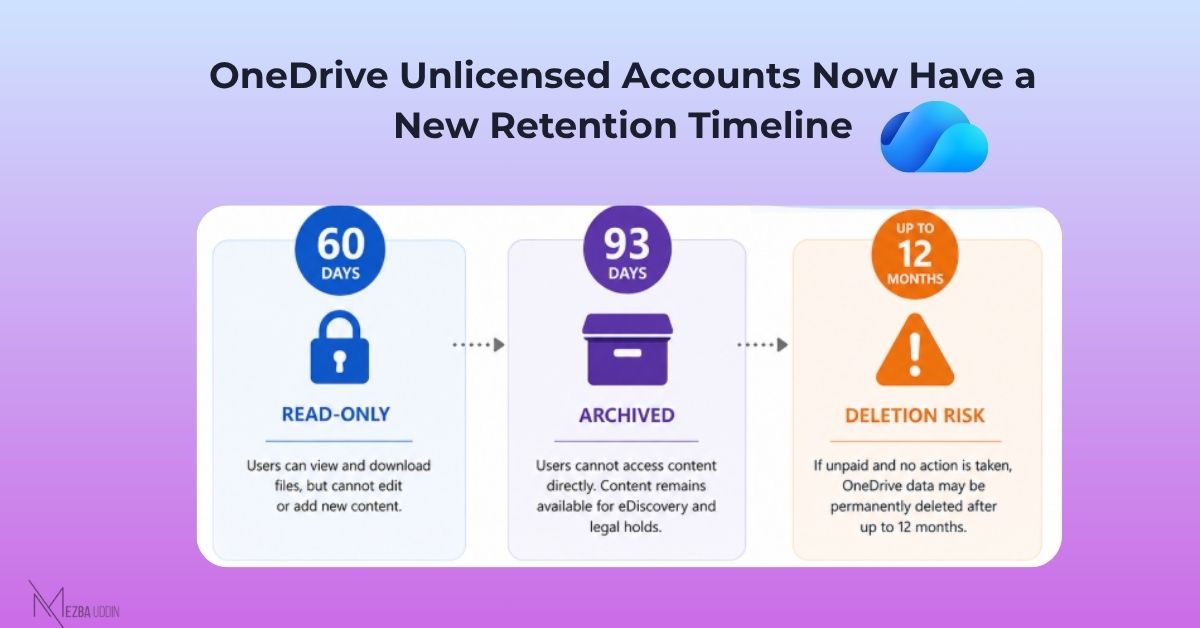
Under the new lifecycle, unlicensed OneDrive accounts will move through multiple enforcement stages:
Day 60: OneDrive Becomes Read-Only
Sixty days after the account becomes unlicensed, users will no longer be able to modify content. The OneDrive enters a read-only state, preserving existing data while preventing further changes.
Day 93: OneDrive Moves to Archive
After 93 days, the OneDrive account transitions to an archived state. The data remains preserved and can still be accessed for compliance scenarios such as eDiscovery and legal holds. However, organizations may need to enable appropriate billing options to maintain access to archived content.
After Up to 12 Months of Non-Payment: Permanent Deletion
If no action is taken and archive or storage charges remain unpaid for up to 12 months, Microsoft may permanently delete the archived OneDrive data.
How Admins Can Prepare
To prevent accidental data loss, administrators should review unlicensed OneDrive accounts and decide how each account should be handled.
Recommended actions include:
- Reassign a OneDrive or Microsoft 365 license if the user account needs to remain active.
- Enable pay-as-you-go archive or standard storage billing to retain archived data.
- Migrate important files to another location if they need to be preserved.
- Review and update retention policies to avoid storing unnecessary inactive data.
Previously, inactive OneDrive accounts could remain in an organization for extended periods without a clear lifecycle, potentially increasing storage costs and administrative overhead. With this staged enforcement approach, Microsoft introduces a more predictable process for managing unlicensed OneDrive data.
Organizations should use the transition period before July 2026 to identify inactive OneDrive accounts, assess the business value of their data, and choose the appropriate retention strategy.
Final Thoughts
The new staged retention enforcement model gives administrators a clear timeline for managing unlicensed OneDrive accounts. While the archived data remains protected for compliance needs, failing to take action could eventually result in permanent deletion.
Review your inactive OneDrive accounts early to avoid unexpected data loss and ensure important business content remains protected.