
We’ve spent the last year learning how to work with AI assistants.
Microsoft Scout suggests the next phase may be letting AI work alongside us.
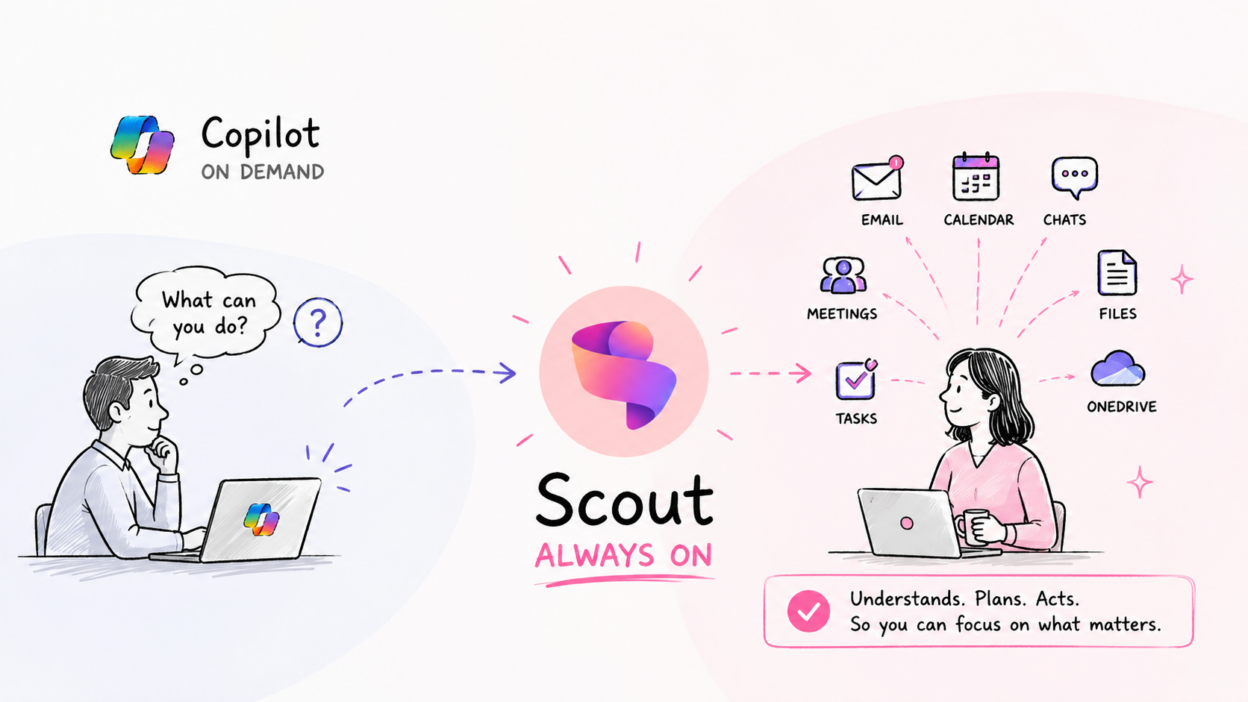
At first glance, it’s easy to think Scout is simply another version of Copilot. It’s not! The difference is less about intelligence and more about the operating model.
- Copilot is primarily interaction-driven. You ask a question, request a summary, generate content, or complete a task, and Copilot responds.
- Scout is designed as a persistent agent. Instead of waiting for the next prompt, it maintains awareness of the work you’ve entrusted to it and continuously works toward defined goals.
What caught my attention is Microsoft’s use of the term “Autopilot agent.” An agent capable of understanding context across emails, meetings, chats, documents, tasks, and schedules, then using that context to help move work forward.
For example, instead of repeatedly asking AI to summarize meetings, track action items, gather supporting information, and prepare follow-ups, Scout can continuously monitor those workflows and surface what needs attention at the right time.
👉🏻The real innovation isn’t that Scout can generate content. Most AI tools can already do that.
👉🏻The innovation is that Scout is being positioned to manage ongoing work rather than individual requests.
Of course, this is also where the enterprise conversation becomes important. As organizations evaluate agent-based AI, questions around governance become just as important as the technology itself:
- What permissions does the agent have?
- Which data sources can it access?
- How are actions monitored and audited?
- What controls exist to prevent unintended actions?
The success of autonomous agents won’t be determined solely by their capabilities. It will depend on how effectively organizations can govern, secure, and trust them.
If you’re interested in testing Scout, Microsoft is currently offering it through a limited private preview and the Frontier program, with setup requiring Frontier enrollment, Intune policy configuration, and user attestation. You can learn more about the onboarding process here: https://learn.microsoft.com/en-us/microsoft-scout/get-started