
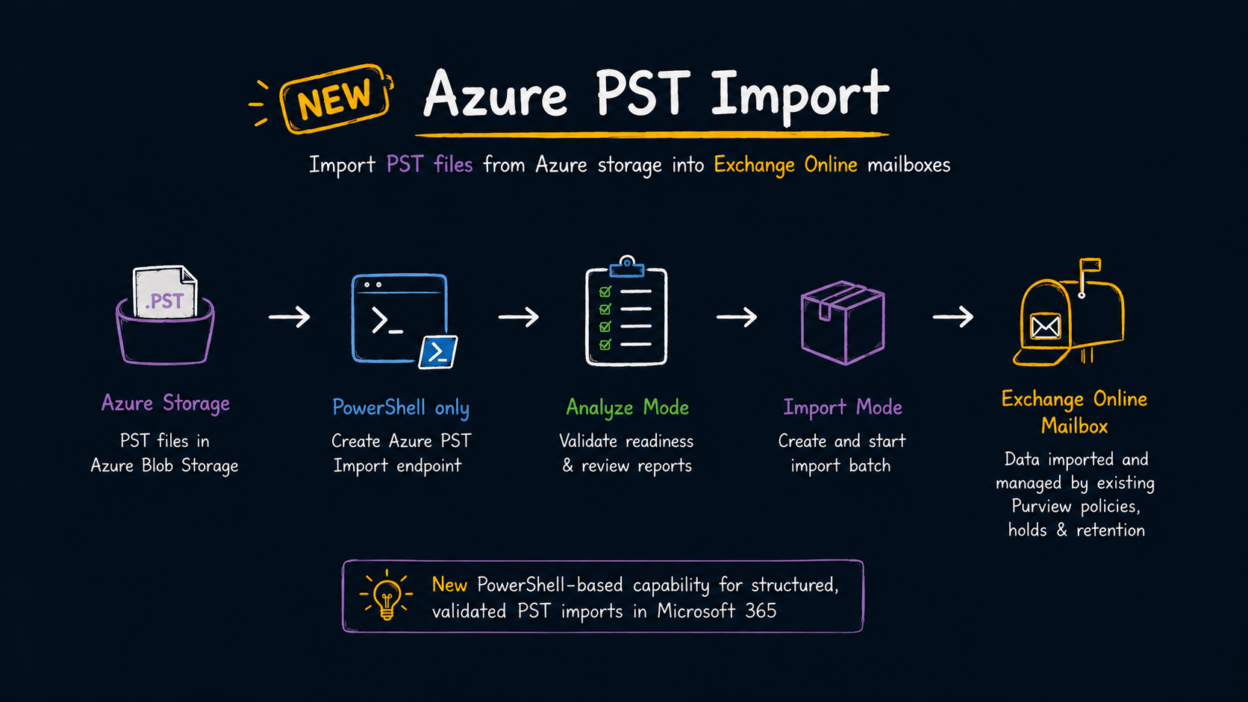
Microsoft is rolling out Azure PST Import, which lets 𝐄𝐱𝐜𝐡𝐚𝐧𝐠𝐞 𝐎𝐧𝐥𝐢𝐧𝐞 𝐚𝐝𝐦𝐢𝐧𝐬 𝐢𝐦𝐩𝐨𝐫𝐭 𝐏𝐒𝐓 𝐟𝐢𝐥𝐞𝐬 𝐟𝐫𝐨𝐦 𝐀𝐳𝐮𝐫𝐞 𝐁𝐥𝐨𝐛 𝐒𝐭𝐨𝐫𝐚𝐠𝐞 𝐢𝐧𝐭𝐨 𝐮𝐬𝐞𝐫 𝐨𝐫 𝐚𝐫𝐜𝐡𝐢𝐯𝐞 𝐦𝐚𝐢𝐥𝐛𝐨𝐱𝐞𝐬.
It is expected to start in late August 2026 and complete by early September 2026.
The important part is the workflow. This is a PowerShell-only experience, with no GUI.
Admins first create an Azure PST Import migration endpoint for the storage account. The Office 365 Import Service then needs the Storage Blob Data Reader role on that storage account.
Before importing anything, Microsoft provides an Analyze mode for the migration batch. This is worth using first because it validates the import setup and target mailboxes, including:
- Whether the referenced PST files exist
- PST file size
- Target mailbox licensing
- Recipient type (UserMailbox)
- Whether the mailbox is inactive or soft-deleted
- Archive availability when importing to an archive mailbox
- Archive and Recoverable Items quota requirements
Once the analysis results are reviewed and the prerequisites are satisfied, admins can create and start the actual import batch.
There is also an important compliance angle here. After the PST content is imported, it becomes part of the target Exchange Online mailbox. That means existing Purview retention policies, retention labels, holds, and deletion workflows can apply to the imported data based on the mailbox configuration.
For organizations still dealing with PST-based archives, this provides a more controlled migration path than treating PST files as standalone archives:
Azure Blob Storage → Analyze → validate → import into Exchange Online → apply existing mailbox compliance controls.