For years, we’ve been interacting with AI the same way, type a prompt, get a response, repeat. It’s efficient, but also limiting. The AI doesn’t really understand the bigger picture of what you’re doing. It just reacts, one request at a time.
Copilot Cowork changes that dynamic.
Instead of sitting on the sidelines waiting for instructions, it steps into the workflow itself, tracking context, contributing across steps, and staying aligned with the task as it evolves. The shift isn’t about better answers; it’s about a different way of working altogether.
From where I stand, this feels less like an upgrade to Copilot and more like Microsoft testing a new model of productivity, one where AI isn’t a tool you use occasionally, but something that operates alongside you throughout the entire process.
The real question isn’t whether it’s powerful. It’s whether this way of working actually holds up once the novelty wears off.
What is Copilot Cowork in Microsoft?
Copilot Cowork is a new mode within Microsoft 365 Copilot. It is not a separate application, not a new subscription tier, and not a chatbot.
The simplest way I can put it: Copilot Chat answers questions. Copilot Cowork completes work.
Instead of:
- Asking Copilot to summarize a document
- Asking it to generate a draft
- Asking it to analyze data
We can now work with Copilot continuously inside a shared workflow context. Like a persistent AI teammate that understands your task, your artifacts, your goals—and contributes alongside you. The context is persistent, not per prompt; tasks are multi-step and evolving, not one-shot; AI is state-aware, not stateless, and interaction becomes collaborative, not transactional.
🔑 The core technical engine under this is called Work IQ. It aggregates contextual signals from across your entire M365 environment, your calendar patterns, your email threads, your meeting history, your files, and uses that as grounding so Cowork “understands” your work the way you do. This is what separates it from a generic AI agent that has no idea who Alex in your team is or what your quarterly priorities are.
In practical terms, Cowork’s out-of-the-box capabilities, as documented, include:
- Drafting and sending emails and Teams messages (not just suggesting them)
- Scheduling, rescheduling, and declining calendar events on your behalf
- Creating Word documents, Excel workbooks, PowerPoint decks, and PDFs from scratch
- Running deep research across both web sources and internal company documents
- Posting to Teams channels and group chats
- Running repeating tasks on a schedule (“every Friday, pull this week’s metrics and update the report”)
- Managing task queues in the list view, kanban board, or scheduled tab
⚠️ Currently in Frontier Preview. As of this writing, Copilot Cowork is not generally available. It rolled out to Microsoft’s Frontier program in late March 2026 after a limited research preview. You need to be enrolled in the Frontier program to access it — and your admin account must also be enrolled, not just your user account.
Copilot Cowork: The Shift From AI Assistant to AI Executor
This is the question I keep hearing from people who have been using Copilot Chat, Claude Bing AI, or ChatGPT in their work. “Isn’t this just another chatbot?” It is absolutely not. Let me walk you through the distinction precisely.
Generation 1 AI: The Research Assistant
The first wave of enterprise AI — Copilot Chat, ChatGPT, and Gemini operates in a request-response loop.
You ask, it answers. You ask it to draft an email, and it drafts the email. What happens next? You happen next. You copy the draft, open Outlook, paste it in, add the recipient, check the attachment, and click Send. The AI wrote something; you did the work.
Generation 2 AI: The Execution Partner
Copilot Cowork operates on a fundamentally different model. It does not hand work back to you after generating content. It executes multi-step workflows end-to-end.
When you ask it to send an email, it composes it, shows you a preview, and after your approval, actually sends it through Outlook. When you ask it to build a research memo, it searches your internal documents, searches the web, synthesizes findings, formats the output, and saves it to your OneDrive. You receive a finished deliverable, not a draft; you need to push through five more manual steps.
The critical architectural difference is agentic autonomy with checkpoints. Cowork is designed to run in the background. You hand it a task, it works while you work on something else, and it surfaces for your approval before taking actions it classifies as medium or high risk. Every action is logged. You can pause, redirect, or cancel at any moment. But the default posture is: keep going until done.
This is not a chat interface. It’s closer to delegating work to a highly capable colleague than to prompting a language model.
The Microsoft–Anthropic Partnership Behind Copilot Cowork
Here’s the part of this announcement that deserves more attention than it’s getting.
Microsoft built Copilot Cowork in close partnership with Anthropic, the company behind Claude. The technology powering Cowork’s core agentic capabilities is derived from Claude Cowork, Anthropic’s own standalone product.
Microsoft didn’t build this from scratch. They integrated Claude’s agentic architecture into Microsoft 365’s enterprise security and compliance layer, then wrapped it in Work IQ to ground it in your organizational data.
🤝 To be clearer:
Copilot Cowork is a multi-model system. It does not rely on a single AI provider. It intelligently routes tasks to the model best suited for the job, whether that’s a GPT-5 variant, a Claude model, or something else. Lamanna called this the “multi-model advantage”: your work is not limited by one brand of models. Microsoft acts as the orchestration and governance layer. The intelligence can come from multiple sources.
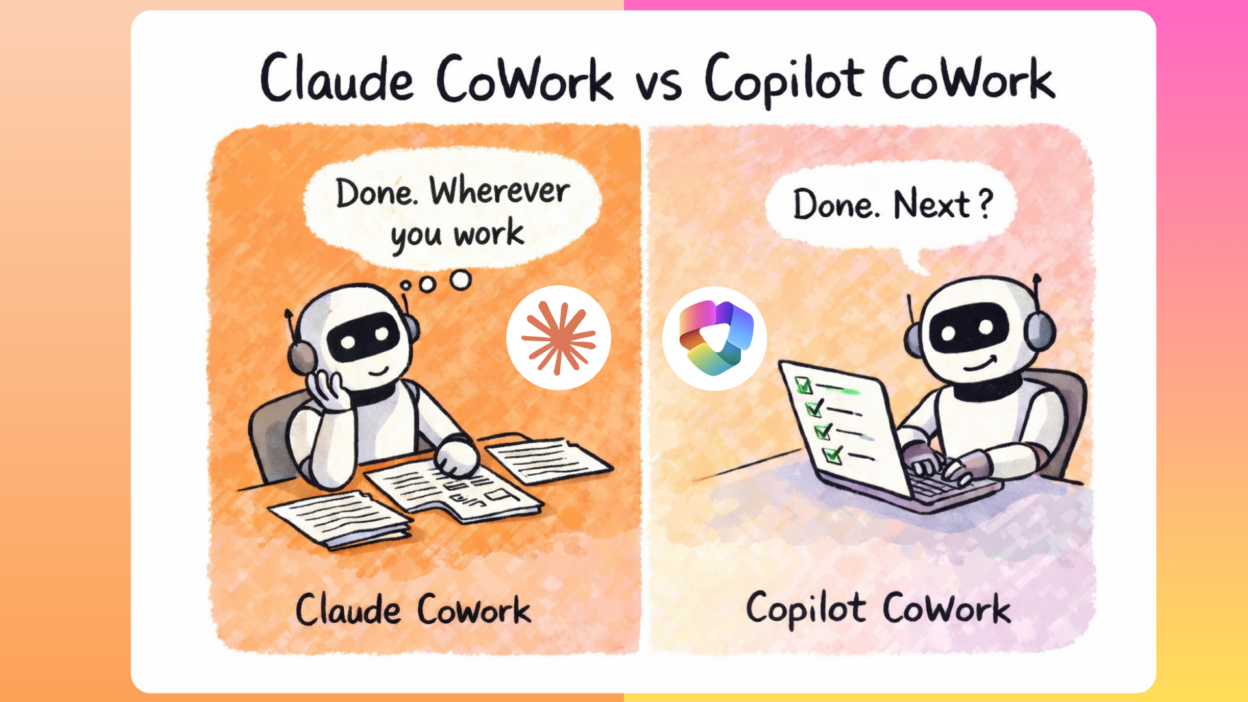
Copilot Cowork vs Claude Cowork
This confuses a lot of people, and understandably so. Both products are called “Cowork.” Both do agentic task execution. Anthropic introduced Claude CoWork, but the philosophy is slightly different. They share underlying technology. So what’s the difference?
| Dimension | Copilot Cowork | Claude Cowork |
| Maker | Microsoft (powered by Anthropic tech) | Anthropic |
| Where it lives | Microsoft 365 Copilot web & desktop app | Claude desktop app (Mac/Windows) |
| Ecosystem | Deep M365 integration: Outlook, Teams, SharePoint, OneDrive, Excel, Word, PowerPoint | Local filesystem + connectors (Slack, Google Drive, Zapier, etc.) |
| Data grounding | Work IQ: signals from your entire M365 org | Your local files + explicitly granted connectors |
| Who it’s for | Enterprise / business M365 subscribers | Individual power users, teams, and enterprise organizations on all paid plans |
| Governance & compliance | Full M365 enterprise policies, identity, permissions, audit logs (some limitations) | Role-based access controls, group spend limits, OpenTelemetry observability (tool calls, files read/modified, connector actions), and usage analytics via admin dashboard and Analytics API. Available on Team and Enterprise plans. |
| Scheduling / automation | Yes — background tasks, recurring workflows | Yes — scheduled tasks, recurring runs |
| Custom skills/plugins | 13 built-in skills; custom skills via OneDrive | Plugins ecosystem (Brand Voice, Legal, Finance, etc.); custom skills |
| Computer use | No (as of Frontier preview) | Yes (macOS) — can interact with screen, apps, browser |
| Mobile | Browser-based access via m365.cloud.microsoft | Paired phone app + desktop required |
| Current status | Frontier preview (late March 2026+) | Generally available on all paid plans (macOS and Windows) as of April 9, 2026 |
| Regulated workloads (HIPAA, FedRAMP) | Check with Microsoft compliance team | Not suitable — explicitly stated |
The most important distinction is the ecosystem.
- If your work happens inside Microsoft 365 and for most enterprise knowledge workers, it does, Copilot Cowork is the natural fit because it has native, deep access to everything you already do. Email, calendar, files, chats, meetings. It doesn’t need you to grant connector permissions one by one; it already knows your organizational context through Work IQ.
- Claude Cowork, operates more broadly. With computer use on macOS it can interact with any application on your screen, not just M365 apps, making it flexible for teams that span multiple ecosystems. Importantly, it now ships with enterprise-grade controls: role-based access via SCIM, group spend limits, OpenTelemetry support compatible with Splunk and Cribl pipelines, and a per-connector permission system that lets admins restrict read vs. write access org-wide.
Copilot Cowork vs Claude Cowork vs Claude Code:
People frequently conflate these tools. Here is the definitive table covering all five major options across both Microsoft and Anthropic’s product lines.
| Tool | Primary Purpose | Takes Real Actions | Runs Autonomously | Ecosystem | For Whom |
| Copilot Chat | Q&A, drafting, summarizing within M365 | ✗ | ✗ | M365 (read-heavy) | All M365 users |
| Copilot Cowork | Execute multi-step work tasks in M365 | ✓ | ✓ | Full M365 suite | Enterprise knowledge workers |
| Claude Chat | Conversation, analysis, writing, coding help | ✗ | ✗ | Browser/app (no file access by default) | Anyone — personal, professional |
| Claude Cowork | Execute non-coding knowledge work on desktop | ✓ | ✓ | Local files + connectors + computer screen | Power users, teams, and enterprise organizations |
| Claude Code | Autonomous coding agent — write, refactor, test | ✓ | ✓ | Terminal + filesystem + git + IDE plugins | Software engineers, developers |
- Copilot Chat and Claude Chat are both sophisticated research and drafting assistants; they give you things to work with.
- Copilot Cowork and Claude Cowork are both agentic execution engines; they do the work for you.
- And Claude Code is the equivalent of Cowork, specifically optimized for software engineering tasks, running in the terminal.
💡 The practical rule of thumb:
- If you live in Outlook, Teams, and SharePoint → use Copilot Cowork.
- If you work across mixed ecosystems on a Mac and want the most powerful standalone agent for computer use, → use Claude Cowork.
- If you write code for a living → Claude Code is in a different category entirely.
- And if you just want smart conversation and drafting, → Claude Chat or Copilot Chat remain perfectly good tools for that.
Copilot Cowork User Feedbacks
The Top Reasons Users Are Impressed With Copilot Cowork
The signal that stands out most from community discussions is that the word “delegate” keeps appearing.
A consistent pattern of positive feedback from early access users:
- Background execution: Users praise being able to hand off a task and genuinely focus on something else — not babysit the AI through each step.
- Approval checkpoints: The risk-level indicator before significant actions (“this is medium risk: Send email to 12 people?”) is consistently highlighted as well-designed.
- Work IQ grounding: Actions that reflect knowledge of ongoing projects, team members, and recent context — rather than generic outputs — are where users notice the quality jump over standard chat AI.
- Multi-deliverable outputs: Getting a deck, a doc, and an updated spreadsheet from a single prompt resonates strongly with people who manage projects.
- Small business appeal: Unexpectedly, several comments note Cowork feels built for the founder or 5-person team wearing multiple hats — not just Fortune 500 deployments.
Copilot Cowork Limitations
I’ll be straight with you: the community feedback on pain points is real and worth taking seriously.
⚠️ On the Microsoft Side
- Frontier access is opaque — confusing for admins to configure, especially the dual enrollment requirement
- Audit log gap for Cowork activity is a major enterprise concern — IT teams can’t yet track what Cowork executed
- Early enterprise users report integration gaps between Cowork and certain Purview compliance policies
- “Not suitable for regulated workloads” disqualifies healthcare, finance, and government use cases for now
- Questions from small business owners about whether IT-free setup is realistic
Pricing, Costs, and Whether This Is Worth the Money
This is the section I’d most want someone to have shown me before I started recommending enterprise AI tools to stakeholders. Let me break this down properly.
Copilot Cowork (Microsoft)
Copilot Cowork is not a separate product. It is a feature that is available in Copilot Premium as per official source for now.
📋 Important caveat: Copilot Cowork is currently a Frontier preview only. You don’t pay more for Frontier access; you apply for it. But broader general availability pricing may change. Watch for Microsoft’s GA announcement.
Claude Cowork (Anthropic)
Included in Claude’s standard plans, no additional charge for the feature. The question is which plan level gives you enough usage for agentic tasks, which are significantly more token-intensive than regular chat.
| Pro
$17/ month (annual) · $20/mo if monthly Cowork included. Good for occasional tasks, folder cleanup, and short reports. Heavy Cowork use will hit limits fast. |
| Max 5×
$100/ month Best for everyday Cowork use, longer, more complex tasks. Most individual power users will be satisfied here. |
| Max 20×
$200/ month For heavy users, delegating complex work throughout the day. The ceiling for individual plans. |
Copilot Cowork isn’t just another feature drop. It’s a shift toward AI that can actually execute, not just assist. The foundations here, grounded context, multi-model handling, controlled autonomy, and built-in governance, show this is being designed for real enterprise work, not demos. But let’s keep it grounded.
This is still early. The value shows up only if you adapt how you work with it. Treat it like a smarter chatbot, and it underdelivers. Treat it like an execution partner with clear instructions and oversight—and it starts to make sense.