For years, Direct Send in Exchange Online operated quietly in the background as a widely adopted convenience feature. It became a common solution for printers, scan-to-email devices, legacy applications, monitoring platforms, scripts, and various internal notification systems. Because it worked reliably with minimal configuration, it was often treated as a low-maintenance operational dependency across many Microsoft 365 environments.
Over time, however, the same simplicity that made Direct Send attractive for administrators also made it attractive to attackers. What was originally viewed as a practical mail delivery mechanism gradually evolved into a growing security concern, particularly in environments where usage was not closely monitored or restricted.
In response, Microsoft has started strengthening protections around Direct Send through the introduction of the Reject Direct Send capability.
I will break this down properly because there’s still a lot of confusion around what Direct Send actually is, what it is not, why it became risky, and what admins should realistically do next.
Direct Send in Exchange Online
Direct Send is one of the three primary methods supported by Exchange Online for devices and applications to send email, alongside SMTP AUTH (authenticated submission) and SMTP Relay.
Its purpose was relatively straightforward: allow devices and applications such as printers, ticketing systems, monitoring platforms, legacy business applications, and automated scripts to send email internally without requiring authenticated credentials or complex relay configurations.
With Direct Send, a device or application sends messages directly to the organization’s Exchange Online endpoint, typically using the tenant’s MX endpoint format such as contoso-com.mail.protection.outlook.com. As long as the sender address belongs to an accepted domain within the Microsoft 365 tenant, Exchange Online processes the message without requiring authentication, connectors, or stored credentials.
In practical terms, Direct Send is an unauthenticated mail submission method that allows devices and applications to send emails directly into an Exchange Online tenant by leveraging the organization’s accepted domain configuration.
Why Direct Send Became a Security Risk in Exchange Online
One of the lesser-discussed concerns with Direct Send is that its behavior historically resembled anonymous inbound internet mail more than a traditional authenticated mail submission process.
In practice, Exchange Online largely trusts the mail flow path and the accepted domain relationship rather than validating the sender through authentication. While this simplified operational scenarios for devices and applications, it also introduced an unintended security gap.
Attackers realized something dangerous:
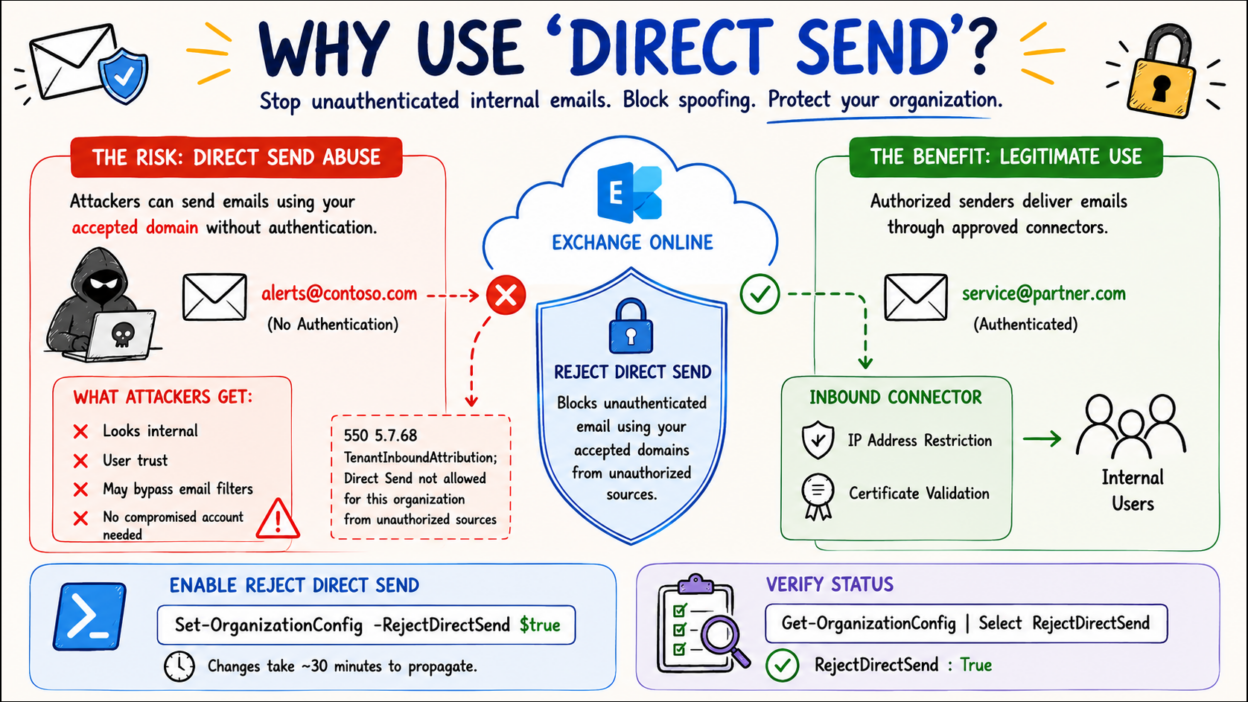
If they can send directly to your tenant using your accepted domain, they can sometimes spoof internal-looking emails without compromising an actual account.
This completely changes the threat model. Instead of relying solely on credential theft or account compromise, attackers could potentially exploit infrastructure behavior to impersonate internal users and distribute convincing phishing emails.
The risk became more concerning because these messages could align with trusted organizational mail flow expectations. Emails routed through Microsoft infrastructure often appeared more legitimate to end users, while traditional indicators such as external warning banners, spoofing suspicion, or abnormal sender behavior were less obvious in certain scenarios. In environments with third-party email filtering solutions, some organizations also discovered that direct-to-tenant routing paths could bypass expected inspection layers entirely if not properly restricted.
Security researchers and incident response teams subsequently began observing phishing campaigns leveraging these techniques, particularly in environments where Direct Send usage remained unrestricted or insufficiently monitored.
The Confusion: “Direct Send” vs “Sending Directly” to your Tenant
One of the biggest misunderstandings around Microsoft’s recent Direct Send security changes is assuming that “Direct Send” and “sending directly to Exchange Online” mean the same thing. They do not.
Actual Direct Send:
As already said, Direct Send specifically refers to unauthenticated email sent into Exchange Online while using one of the organization’s accepted domains as the sender address. In this scenario:
- The sender address belongs to the organization’s accepted domain
- No authentication is performed
- No connector validates the sending source
- The message is delivered internally within the tenant
This behavior historically allowed devices, applications, and internal systems to send mail without storing credentials or configuring authenticated SMTP. However, because the sender identity relied primarily on domain ownership rather than authentication, it also introduced spoofing risks.
Sending Directly to Exchange Online
Sending directly to Exchange Online is broader SMTP behavior. Any external sender can technically route email directly to a tenant’s Exchange Online MX endpoint if the MX record is known, such as:
contoso-com.mail.protection.outlook.com
That alone is not Direct Send abuse. The real concern begins when unauthenticated messages attempt to use the organization’s accepted domain. That is what Reject Direct Send is designed to block.
Distinction between them:
This confusion is especially common in organizations using third-party filtering services such as Mimecast or Barracuda Networks. Even when all mail is expected to pass through those services, external senders can still bypass them by routing directly to the Exchange Online endpoint.
Reject Direct Send does not fully stop this bypass path. It only blocks unauthenticated messages using the organization’s accepted domains.
To fully restrict direct-to-tenant delivery, organizations should configure inbound connectors using:
- RestrictDomainsToIPAddresses
- RestrictDomainsToCertificate
Organizations not ready for strict enforcement can instead use transport rules to quarantine mail arriving from unapproved sources while monitoring existing dependencies.
How Reject Direct Send Works in Exchange Online
To address the growing risks associated with unauthenticated internal domain spoofing, Microsoft introduced a tenant-level Exchange Online setting called Reject Direct Send.
When enabled, this feature blocks anonymous email sent directly to the tenant if the sender’s domain matches one of the organization’s accepted domains and the message does not arrive through an approved inbound connector or trusted mail flow path.
In practical terms, Exchange Online rejects messages attempting to impersonate the organization’s domain unless the sending source can be validated through authorized infrastructure. This helps prevent unauthenticated Direct Send abuse commonly associated with internal spoofing scenarios.
How to Disable Direct Send Using PowerShell
Administrators can enable the feature using the following Exchange Online PowerShell cmdlet:
Set-OrganizationConfig -RejectDirectSend $true
By default, RejectDirectSend is set to $false, so nothing changes unless you enable it. But Microsoft has already announced that for new tenants, they plan to enable this by default eventually, and new tenants won’t even be able to disable it. Configuration changes typically take up to 30 minutes to propagate across Exchange Online mailbox servers within the tenant.
And to verify:
Get-OrganizationConfig | Select RejectDirectSend
Once enabled, unauthorized Direct Send attempts are rejected with SMTP responses similar to:
550 5.7.68 TenantInboundAttribution;
Direct Send is not allowed for this organization
from unauthorized sources
This response indicates that Exchange Online detected an unauthenticated message attempting to use the organization’s accepted domain outside of an approved mail flow configuration.
How to Safely Enable Reject Direct Send Without Breaking Legitimate Mail Flow
While Reject Direct Send strengthens protection against unauthenticated internal domain spoofing, enabling it without proper assessment can disrupt legitimate mail flow dependencies across the organization.
Many environments still rely on Direct Send for operational systems such as printers, scanners, monitoring platforms, ticketing solutions, business applications, and third-party services including Zendesk or Constant Contact. If these systems currently send mail anonymously using the organization’s accepted domain, their messages will begin failing once Reject Direct Send is enabled.
Why Inbound Connectors Become Important
The recommended approach is to migrate legitimate senders away from unrestricted Direct Send behavior by configuring dedicated partner inbound connectors in Exchange Online.
A partner connector allows Exchange Online to validate trusted senders through:
- Approved source IP address ranges
- TLS certificate validation
- Authorized mail flow paths
Once mail is received through a configured connector, Exchange Online treats the traffic as authenticated infrastructure-level mail flow, meaning Reject Direct Send protections will not block it.
Before enabling the setting, organizations should identify every application, device, and service currently relying on anonymous Direct Send and determine whether connector-based authentication is required.
Using SPF Records to Identify Legitimate Senders
One practical starting point is reviewing the organization’s SPF record. Legitimate third-party senders using the organization’s domain should already appear within SPF configuration.
If a sender is absent from SPF, there is a strong possibility that the service is already encountering deliverability or reputation-related issues. While SPF alone does not fully identify all Direct Send usage, it often provides a useful baseline for discovering systems that may require remediation before Reject Direct Send is enforced.
How to Audit Existing Direct Send Traffic in Exchange Online
Enabling Reject Direct Send without visibility into existing mail flow introduces unnecessary operational risk. Before enforcement begins, administrators should first determine which messages currently rely on unauthenticated delivery paths.
Microsoft is developing a dedicated Direct Send reporting capability, but until it becomes available, several existing tools can help identify affected traffic.
Historical Message Trace in Exchange Admin Center
The Exchange Admin Center provides one of the simplest methods for identifying potentially impacted mail flow. Under: Reports → Mail Flow. Administrators can generate an Inbound Messages report using filters such as: Connector Type: No Connector and TLS Version: No TLS
This helps identify messages received without authenticated connectors or secured transport, effectively highlighting traffic that may depend on Direct Send behavior. Historical reporting can typically provide visibility into up to 90 days of activity.
Exchange Online Message Trace V2
Message Trace V2 offers deeper inspection capabilities for individual messages and delivery paths.
A useful approach involves reviewing internal-to-internal mail flow and analyzing the ConnectorName field within detailed trace results. If the connector field is blank, the message likely arrived without a configured connector, making it a potential Direct Send candidate. Authentication results should also be reviewed carefully:
- SPF failures
- Missing DKIM signatures
- DMARC failures
Messages failing all three checks simultaneously often indicate spoofing attempts or unauthorized sender activity rather than legitimate operational mail flow.
Advanced Hunting in Microsoft Defender for Office 365
Organizations using Microsoft Defender for Office 365 Plan 2 can leverage Advanced Hunting for more precise analysis. Using KQL queries, security teams can identify inbound mail that:
- Arrived without a connector
- Failed DMARC validation
- Originated from suspicious infrastructure paths
This provides significantly better visibility into high-risk Direct Send traffic patterns and helps distinguish legitimate operational systems from potential abuse attempts.
Before enabling Reject Direct Send, organizations should establish a clear understanding of existing dependencies, validate trusted senders, and transition legitimate systems to authenticated connector-based mail flow wherever possible.
My Recommendation for Exchange Online Admins
If you manage Exchange Online today, this should realistically be your approach:
- Step 1 —Find every application, device, or workflow using anonymous mail delivery.
- Step 2 — Classify legitimate dependence because some systems may still genuinely require it temporarily.
- Step 3 — Migrate to authenticated methods. Use connectors, SMTP AUTH, or modern relay methods wherever possible.
- Step 4 — Once you’re confident legitimate dependencies are addressed, disable direct send in Exchange Online.
- Step 5 — Don’t stop after that. Do continuous monitoring, because mail flow changes constantly in enterprise environments.
It’s not a difficult change, but it does require knowing what you have. Take that step first, and enabling the protection becomes straightforward. Your users — and your inbox — will be better off for it.