AI meeting bots, tools that transcribe, summarize, or record your conversations, have quietly become a fixture in online meetings. Many are genuinely useful. But the problem is not all of them are invited, and until now, most organizations have had no reliable way to know they were even there.
Microsoft is changing that.
Teams is rolling out a new bot-detection capability that surfaces external meeting assistant bots the moment they try to join, giving organizers the visibility and the choice they’ve been missing.
The Risks with Uninvited AI Meeting Bots
AI-powered meeting bots from third-party services can join a Teams meeting just like any other participant. The trouble is, some of these bots get in without the meeting organizer or the host organization ever knowing they were there.
This creates a few potential concerns:
- Sensitive information exposure – Confidential discussions may be transcribed and sent to third-party services that your organization has never approved.
- Compliance risks – Bots can record or process meeting data without the organization’s knowledge, creating potential regulatory exposure.
The core issue is simple: organizations lacked visibility into automated participants inside their own meetings.
Microsoft’s new capability is designed to shine a light on exactly this scenario — flagging bots before they get comfortable in your meeting.
How Microsoft Teams Detects External Meeting Assistant Bots in Meetings
With this update, Teams will automatically identify external meeting assistant bots as they attempt to join any meeting hosted by your organization.
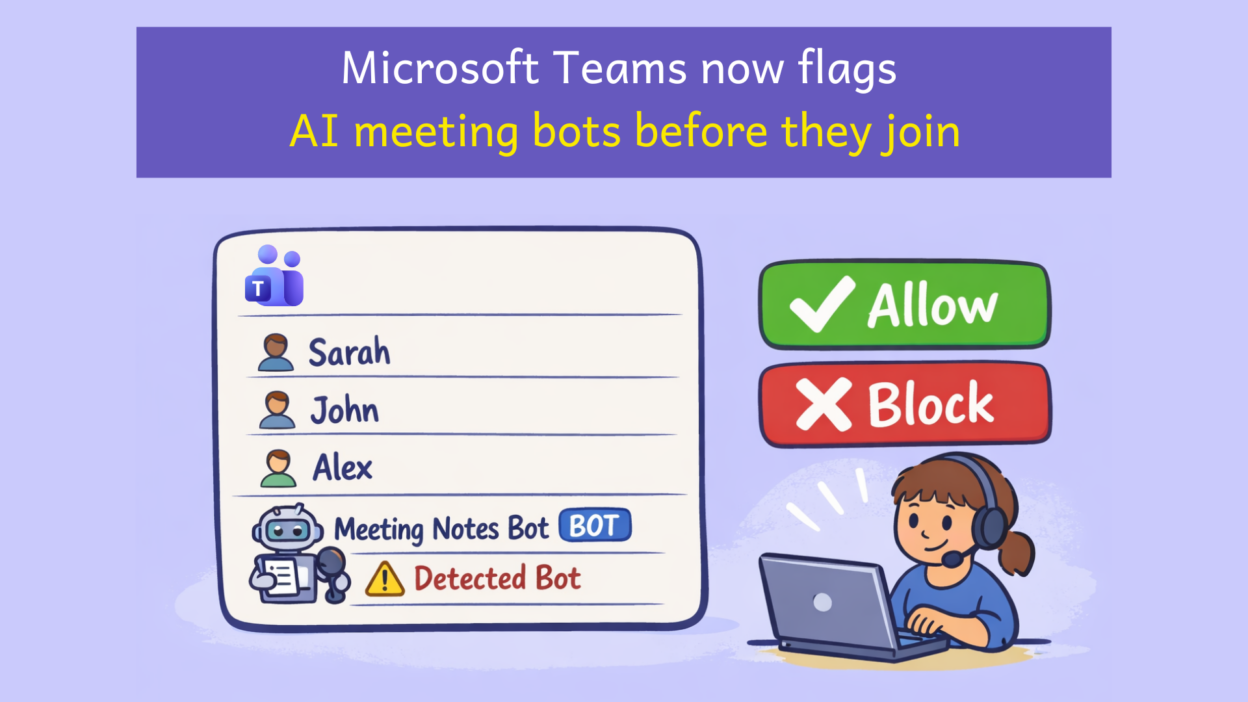
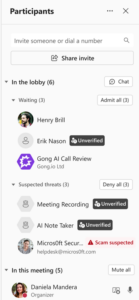
Instead of slipping in silently, a detected bot will be held in the meeting lobby and clearly labeled, so the organizer knows immediately they’re not dealing with a regular participant.
- The bot attempts to join: Teams intercepts it in the lobby and labels it as a detected bot.
- Organizer is notified: a clear indicator distinguishes the bot from human participants.
- Organizer decides: approve entry, deny access, or remove the bot from the meeting entirely.

It’s worth noting one honest limitation Microsoft has flagged: not every bot will be caught in every scenario. Some may still bypass detection depending on how they connect to meetings. To help improve accuracy over time, Microsoft is asking users to report any suspicious participants directly from within the Teams interface.
The detection system is a significant improvement, but user awareness remains part of the equation. If something looks off, report it.
New Meeting Policy to Manage External Meeting Bots
Alongside the organizer-facing experience, Teams administrators will gain a dedicated meeting policy in the Teams admin center to govern how detected bots are handled at the organizational level. The available options will include:
- Detect bots and require organizer approval (recommended)
- Disable bot detection entirely
- Configure how bots are handled when detected
Bot detection will be enabled by default for all tenants — so even organizations that take no action will benefit from a baseline layer of protection. Microsoft has also indicated that more granular admin controls are planned for future updates.
The rollout follows a phased schedule. Once the feature reaches your tenant, it will activate automatically with the default detection policy in place.
- Phase 1: Targeted Release: Mid-May 2026
- Phase 2: GA (Worldwide and GCC): early June 2026
How to Prepare Your Organization for Teams Bot Detection
A little preparation goes a long way. Here’s what to do once the feature rolls out to your tenant:
- Review the new meeting policy in the Teams admin center and confirm the default setting aligns with your organization’s needs.
- Brief meeting organizers on the new lobby indicators and approval prompts they’ll start seeing.
- Update internal helpdesk or governance documentation to reflect the new meeting controls behavior.
- Monitor the Microsoft 365 Message Center for further admin controls as they are released.
AI meeting assistants are becoming a normal part of modern collaboration. This Teams update adds an essential layer of transparency — making bot participation an informed, intentional decision rather than something that just happens in the background. As AI tools continue to evolve, visibility and control inside enterprise meetings won’t be a nice-to-have. They’ll be the baseline.