As Copilot agents become more common across Microsoft 365, controlling who can access and use these agents is no longer optional; it’s a governance requirement.
Agents can be built by Microsoft, by third-party developers, or internally by your own team using Copilot Studio. These agents can interact with organizational data or external APIs; haphazard deployment can lead to:
- Data Risks: Non-Microsoft agents may process data under different privacy terms.
- Cost Management: Some premium agents may incur additional consumption costs.
- User Confusion: Overwhelming users with too many niche agents can degrade the user experience.
Microsoft provides a centralized User access setting in the Microsoft 365 admin center to control how agents are accessed within an organization.
I will break down what the setting actually controls, how it interacts with other policies, and how admins should approach it in real-world environments.
How to Control AI Agents in Microsoft 365
Microsoft has streamlined the management process by centralizing agent controls within the Microsoft 365 admin center.
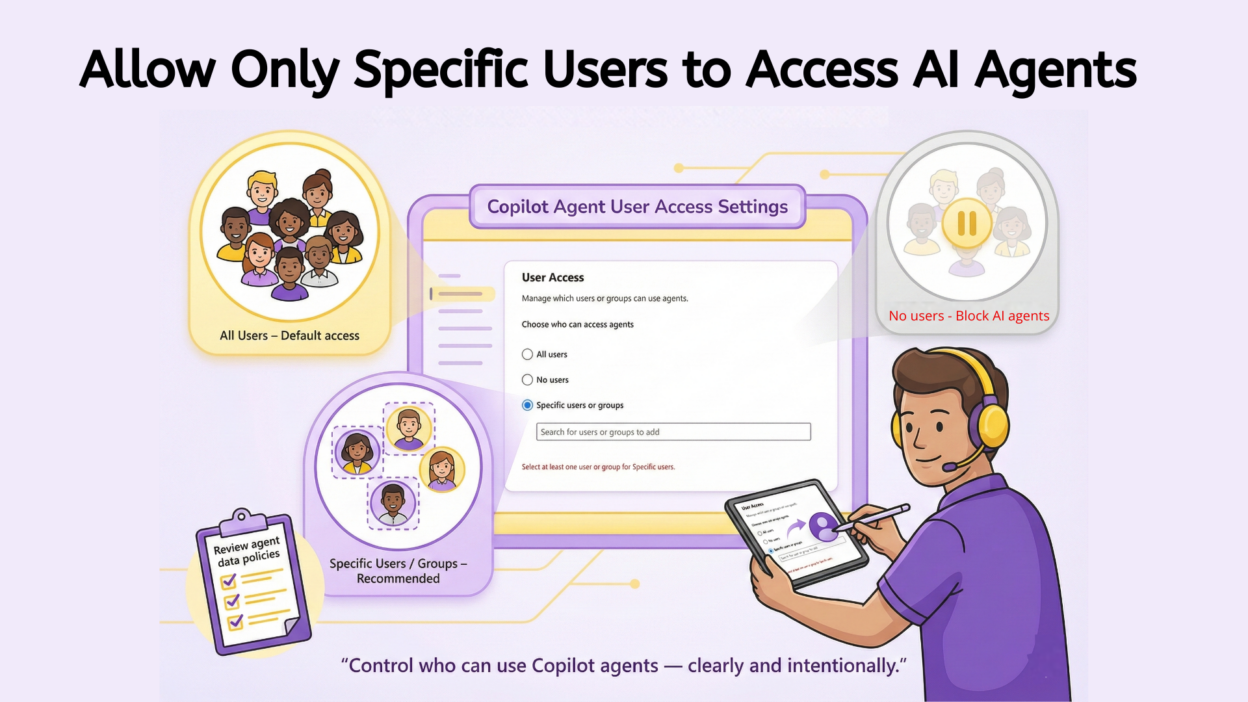
The User access setting determines who is allowed to access and use Copilot agents across your tenant. It does not replace app permission policies, assignment rules, or licensing requirements. It’s the first checkpoint:
- Even if a user can see an agent
- Even if the agent exists in the Agent Registry
- Even if app policies allow installation
The user cannot use the agent unless this setting permits it. To configure who can see and install agents in your tenant, follow these steps:
- Log in to your Microsoft 365 admin center portal.
- In the left-hand navigation menu, go to Agents, then select Settings. From there, click on User access.
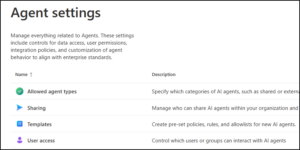
3. You will be presented with three distinct tiers of access. Choosing the right one depends on your organization’s digital maturity and security posture.
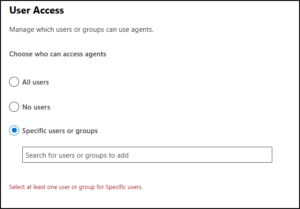
The Three Access Tiers to Control AI Agents
Microsoft provides three levers to control agent distribution:
- All users (Default): This is the “Open” approach. Allmembers of your organization can access and install agents, provided they comply with your existing Integrated Apps policies. This is ideal for organizations that want to encourage rapid AI adoption and experimentation.
This is where many admins make a false assumption. “All users” does not mean uncontrolled access. What still applies:
- App permission policies
- Licensing
- User or group assignments
- Agent-specific restrictions
However, from a governance perspective, this setting assumes trust by default, which may not be appropriate in regulated or cost-sensitive environments. Best suited for:
- Small or highly trusted tenants
- Organizations already enforcing strict app and license controls
- Early Copilot adoption phases with limited agents
- No users: Thisis the “Locked” approach. It blocks access to AI agents itselfcompletely which means no one in the organization can access agents. While this ensures maximum security, it also prevents the organization from realizing the efficiency gains of AI automation. Use this temporarily if you are conducting a full security audit of the agent ecosystem. Even if:
- Users are licensed
- App policies allow access
- Agents are assigned
They still won’t be usable.
- Specific users or groups: This is the “Phased” approach and usually the best practice for most enterprises. You can select specific security groups or individual users whoare authorized to use agents. This allows you to run “Pilot Programs” with departments (like IT or Marketing) before a company-wide rollout.
This is the most practical and recommended option for most organizations. Even if other users technically have permission to install agents, only the selected users or groups can actually use them. This distinction matters:
- Visibility ≠ usability
- Installation rights ≠ execution rights
This approach enables controlled rollout, predictable costs, and clearer accountability.
The Often-Ignored Risk: Non-Microsoft Agents!
Microsoft clearly states that data processed by non-Microsoft agents is not covered by Microsoft’s agreements. This is not a legal footnote; it’s a real operational risk. If users can access third-party agents:
- Data may leave Microsoft’s compliance boundary
- Privacy terms vary by publisher
- Internal data handling policies may be violated unintentionally
Before allowing access:
- Review the agent publisher’s data handling terms
- Validate alignment with internal security and compliance policies
- Involve legal or risk teams if required
This alone is a strong argument against leaving User access set to All users by default.
Common Admin Mistakes to Avoid
Managing an AI ecosystem requires a different mindset than traditional software management. To maintain a healthy tenant, avoid these four critical pitfalls:
- Assuming App Policies Alone Are Enough: While Integrated App policies manage the deployment of the software, the User access settings for agents act as a separate enforcement layer. You must configure both to ensure that agents are not only installed but also functionally active for your intended audience.
- Granting Access Without CostVisibility: Agent usage can drive unexpected spend, especially if third-party tools require premium licenses or consume specialized API credits. Without monitoring usage before a wide rollout, your organization may face a “blank check” scenario with rising consumption costs.
- Using Individual User Assignments: Assigning access to individuals rather than security groups is a manual process thatfails to scale. This approach becomes unmanageable fast, leading to security debt when users change roles or leave the organization.
- Ignoring Third-Party Agent Implications: Data processed by non-Microsoft services may not be subject to your standard Microsoft privacy agreements. In regulated industries, failing to vet a third-party publisher’s data handling practices could lead to significant compliance breaches.
Copilot agents can deliver real value, but only when access is governed with the same discipline as any other enterprise application! So, controlling user access is the first step in building a “Center of Excellence” for AI within your company.