Microsoft is officially retiring the legacy IDCRL (Identity Client Run Time Library) authentication protocol as part of its Secure Future Initiative (SFI). While IDCRL served its purpose in earlier authentication models, it was designed for a different era and it no longer aligns with today’s security requirements.
- Starting January 31, 2026, authentication requests relying on IDCRL will be blocked by default.
- Organizations may temporarily re-enable legacy authentication only until April 30, 2026, to support migration efforts.
- However, beginning May 1, 2026, IDCRL will be permanently retired and cannot be re-enabled.
This change accelerates the shift toward modern authentication standards such as OpenID Connect and OAuth. These protocols offer stronger security controls, better support for Multi-Factor Authentication (MFA), and improved resilience against modern authentication-based attacks.
What is IDCRL Authentication in SharePoint?
IDCRL (Identity Client Run Time Library) is a legacy authentication protocol that was previously used in SharePoint Online and OneDrive for Business for certain client authentication scenarios. It is most commonly associated with older CSOM (Client-Side Object Model) implementations, especially scripts and applications that rely on basic username/password-based sign-in methods.
Given how authentication security has evolved, Microsoft’s decision to retire IDCRL is not unexpected. Legacy authentication methods like IDCRL often:
- Have limited compatibility with modern security controls such as Multi-Factor Authentication (MFA)
- Expand the attack surface by enabling outdated sign-in flows
- Are more susceptible to credential-based attacks
- Encourage insecure practices such as embedding or storing passwords in scripts and automation jobs
To strengthen security and standardize authentication practices, Microsoft is enforcing modern authentication protocols, including:
- ✅ OpenID Connect
- ✅ OAuth 2.0 (token-based auth)
It’s important to note that most interactive sign-in experiences have already transitioned to OAuth for years. However, the bigger risk lies in the background; many organizations still have legacy scripts, scheduled tasks, and custom applications silently using IDCRL behind the scenes, which may go unnoticed until authentication starts failing.
SharePoint Online IDCRL Deprecation Dates
Microsoft has clearly defined deadlines for retiring IDCRL authentication, and these dates are critical for avoiding service disruptions in SharePoint Online and OneDrive for Business.
✅ January 31, 2026 — Legacy Authentication Blocked by Default
This is the first major enforcement date. Starting this day, IDCRL-based authentication will be blocked by default. Any applications, scripts, or automation jobs still using IDCRL may begin failing unless they are updated.
✅ Temporary Re-enable Window: Until April 30, 2026
If required, administrators can temporarily restore legacy authentication using PowerShell to prevent immediate disruption, but this should be treated as a short-term workaround, not a long-term solution. Microsoft allows a temporary escape route: Admins can re-enable legacy auth via PowerShell using:
- AllowLegacyAuthProtocolsEnabledSetting = TRUE
- LegacyAuthProtocolsEnabled = TRUE
This buys you time, but only until the end of April.
❌ May 1, 2026 — Permanent Retirement (No Rollback Option)
From this date onward, IDCRL authentication will be permanently blocked and cannot be re-enabled, even via PowerShell. Any remaining legacy dependencies will result in authentication failures.
To avoid outages, organizations must complete their migration to modern authentication by April 30, 2026.
IDCRL Retirement Impact
While explaining this, I got some questions from a few. “I don’t even know what my apps use!” I can understand why the question is raised. There are two main ways to tell if you’re using IDCRL:
In general, your organization may be impacted if you still rely on:
- Older SharePoint migration scripts or tools
- Legacy automation processes
- CSOM-based scripts using stored username/password
✅ If your C# code or scripts use the SharePointOnlineCredentials library, you are using IDCRL authentication.
That library relies on IDCRL under the hood, even if your code doesn’t explicitly mention it.
✅ Also, if your applications are making calls to either of these endpoints, that’s a strong indicator that IDCRL is involved:
If any of these exist in your environment, those apps or scripts are at risk of failing once IDCRL enforcement begins.
How to Identify IDCRL Authentication Usage Using Purview Audit Logs
You don’t need to manually search through lines of code to detect IDCRL usage. Microsoft provides a reliable way to track this through telemetry using the Microsoft Purview portal. You can check audit logs and confirm whether your tenant is still processing IDCRL-based sign-ins.
- Go to: https://purview.microsoft.com
- Navigate to the Audit section.
- Under Activities – operation name, search for:
✅ IDCRLSuccessSignIn
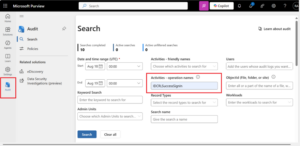
4. Add other filters (users, date range, workload etc.)If you see results, it indicates that someone (or some automation/app) in your organization is still authenticating using IDCRL.
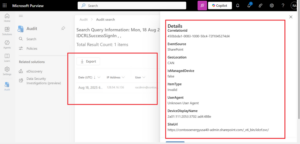
IDCRL to OAuth Migration Path for SharePoint and OneDrive Scripts
If you’ve identified IDCRL usage in your tenant, you have clear migration options. The key is to choose the right approach based on how your scripts/apps are built and how quickly you need to modernize.
Option A: Migrate to Modern Authentication Using MSAL (Recommended Approach)
The best move is to switch to the Microsoft Authentication Library (MSAL). This is the modern, secure way to handle OAuth. You’ll need to register your application in Microsoft Entra to get an access token. Yes, it may feel like a few additional steps initially, but once it’s set up, it’s much more secure and reliable.
Option B: Upgrade Microsoft.SharePointOnline.CSOM NuGet Package
If your scripts or tools heavily depend on SharePointOnlineCredentials, rewriting everything immediately may not be realistic, especially for admins managing multiple automation processes.
To support this scenario, Microsoft released an updated Microsoft.SharePointOnline.CSOM NuGet package that provides a migration-friendly path from IDCRL to modern authentication.
In this new version, they’ve added a useModernAuth:true parameter. When enabled, the library stops relying on legacy IDCRL flows and transitions to modern authentication.
MFA Considerations for IDCRL Migration
If your tenant enforces MFA, you may need to enable interactive authentication in certain cases by passing: interactiveAuth:true
However, interactive authentication is not always suitable for automation tasks. For these scenarios, the recommended solution is to use:
✅ App-Only Authentication through Microsoft Entra ID
What I’d do if I were you
The reality is that legacy IDCRL dependencies are often hidden in places most admins don’t actively monitor, scheduled tasks, old servers, automation runbooks, or even scripts.
To stay ahead of unexpected outages, here’s the action plan I’d personally follow:
- Review Microsoft Purview Audit logs immediately to confirm whether your tenant is still generating IDCRL sign-ins
- Identify scripts and applications using SharePointOnlineCredentials or legacy IDCRL endpoints
- Prioritize migration to modern authentication (OAuth/MSAL) as the long-term fix
- Use the temporary PowerShell re-enable option only as an emergency bridge, not a permanent solution
- Complete migration before April 30, 2026, to avoid any last-minute disruptions
Because after May 1, 2026, there is no workaround, only downtime.