
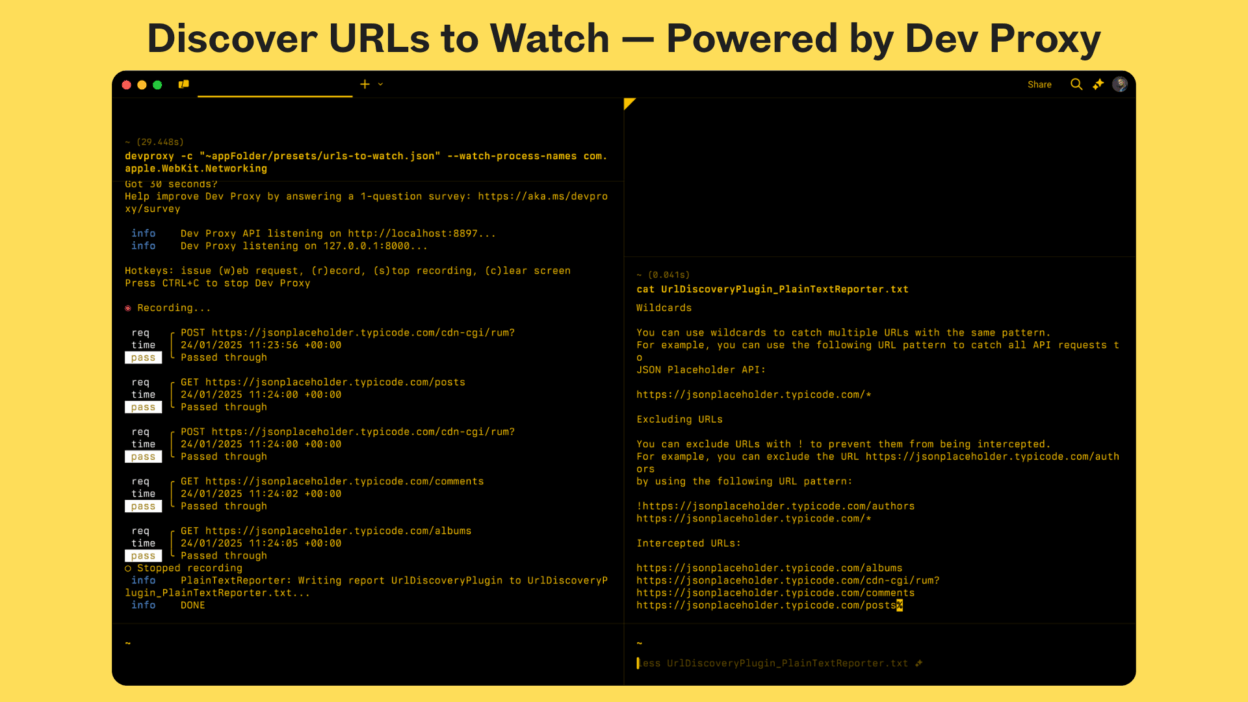
How do you know which APIs your app is actually talking to?
Here’s something that makes it simple — 𝐭𝐡𝐞 𝐃𝐞𝐯 𝐏𝐫𝐨𝐱𝐲 `–𝐝𝐢𝐬𝐜𝐨𝐯𝐞𝐫` 𝐨𝐩𝐭𝐢𝐨𝐧. Instead of manually tracing network calls or guessing which endpoints your app hits, just run Dev Proxy with this option.
- When you run Dev Proxy in discovery mode, it automatically tracks and logs every URL your application requests. This isn’t just a traffic dump; it uses the UrlDiscoveryPlugin to record unique endpoints and the PlainTextReporter to output them neatly into a text file.
- You can even scope discovery to a specific process (for example, msedge) so you capture only your app’s requests instead of everything happening on your machine. This makes it especially useful for debugging client-side apps or mapping dependencies before setting up simulations.
- Once you stop the proxy, you’ll have a complete list of URLs your app called, ready to use for mock configurations, performance tests, or policy validations.
If you work with API-driven applications, this is an efficient way to see what’s really happening under the hood.
Try it out: https://learn.microsoft.com/en-us/microsoft-cloud/dev/dev-proxy/how-to/discover-urls-watch